Social posts, ready to publish.
Inside your AI workstation.

Review, schedule and publish what you create in chat.
No downloads. No re-uploads.

Free to start · Plugin in private preview

START WITH A REFERENCE YOU WANT TO REUSE

Choose a Favourite.
Give your next post a direction.

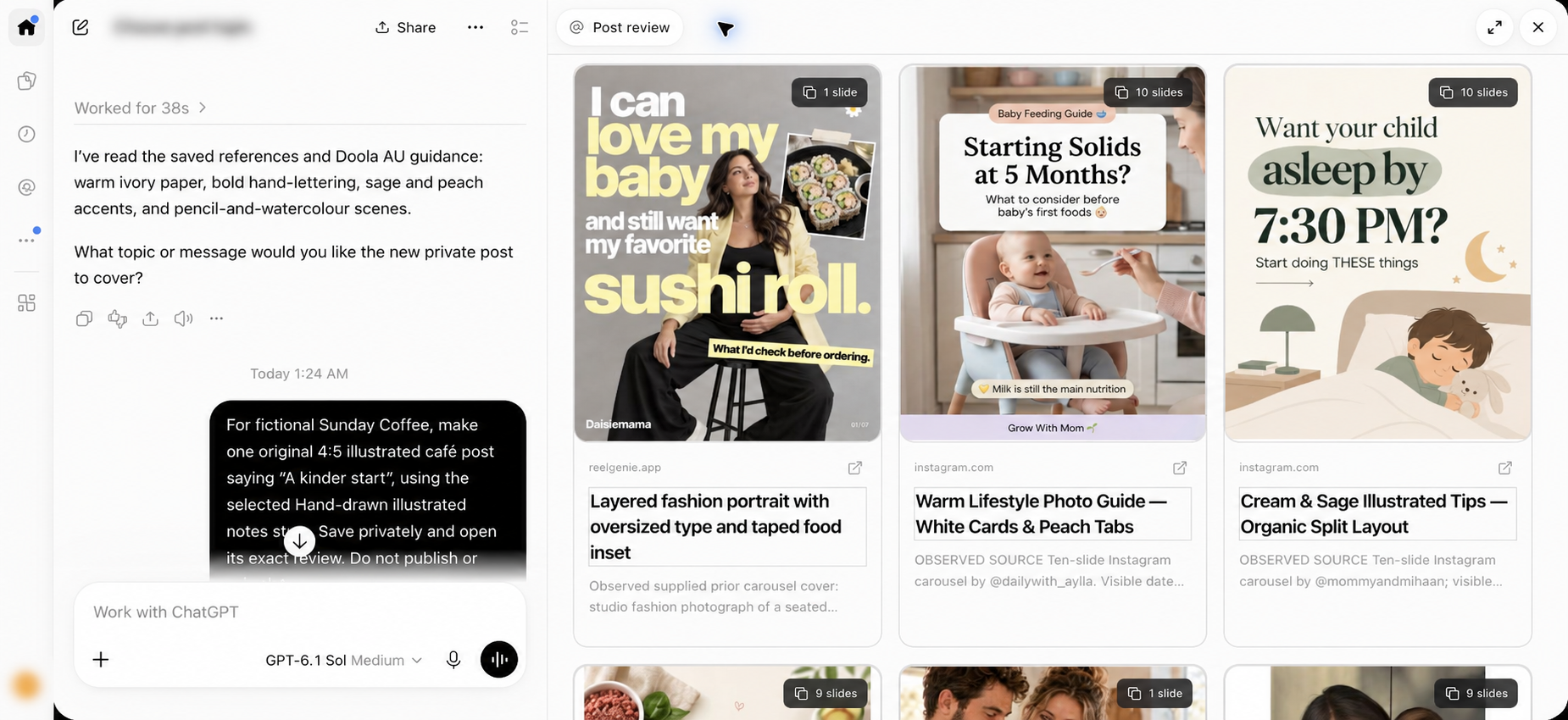
Preview a saved reference and its creative guidance beside the conversation. Use its style as a starting point, then ask AI to create original content for your audience and topic.

Actual ChatGPT Work conversation beside multiple saved Favourite references in the ReelGenie grid, with complete cover cards and no details dialog.
ChatGPT Work capture, edited for privacy · The reference and conversation stay side by side.
FROM IDEA TO DELIVERY

You made it in chat.
Now get it out into the world.

The creative is ready. You shouldn’t have to download every image, upload it somewhere else, rebuild the post and start again. ReelGenie carries the finished files into review beside your conversation—so you can move straight to the decisions that matter.

01–02 · CREATE & REVIEW

Your finished post.
Already in the phone preview.

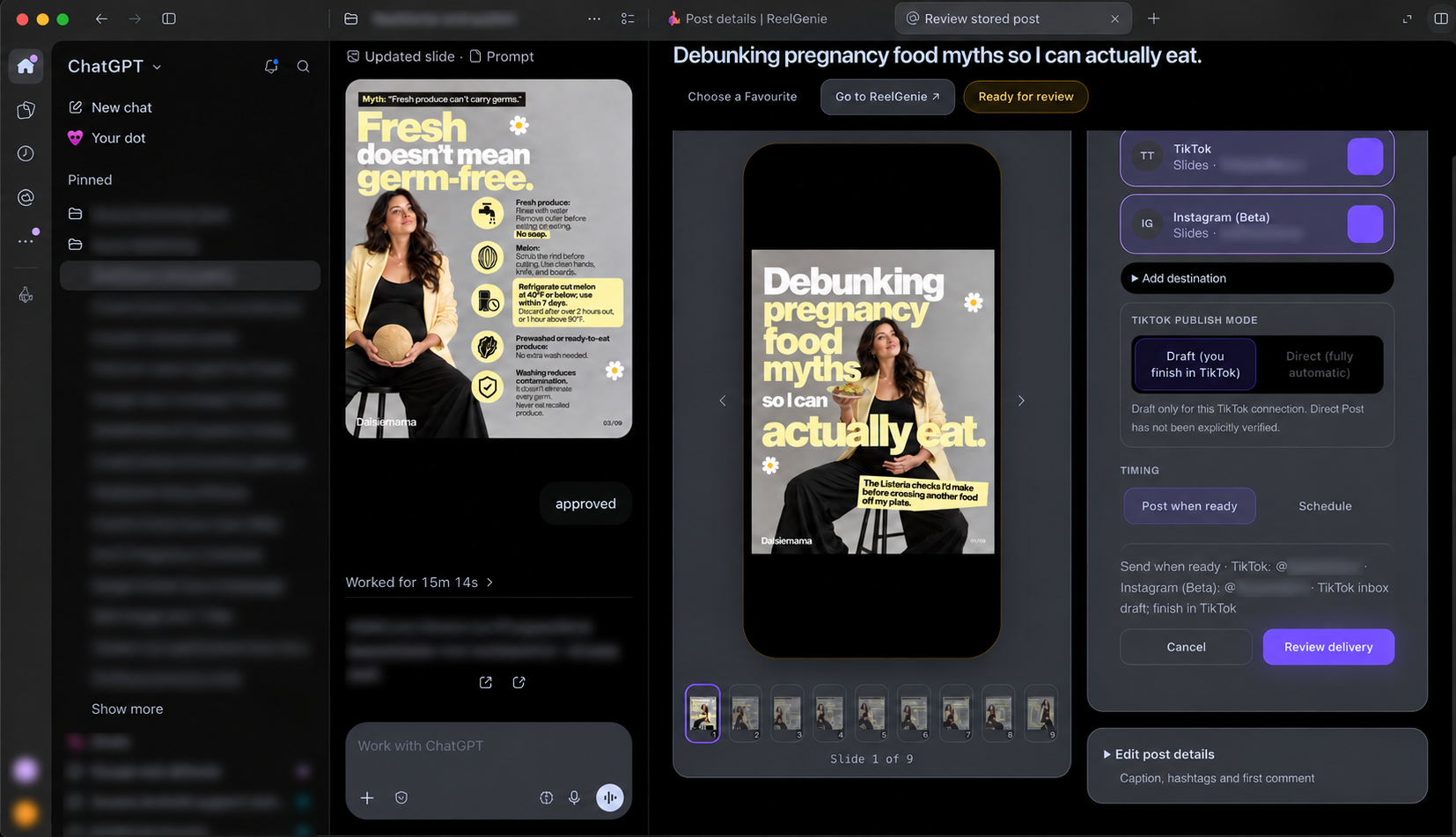
Ask AI to create your post and save it privately to ReelGenie. The original media and copy arrive together. Review the creative in the phone frame, move through your slides, and check the caption—with the conversation still beside you.
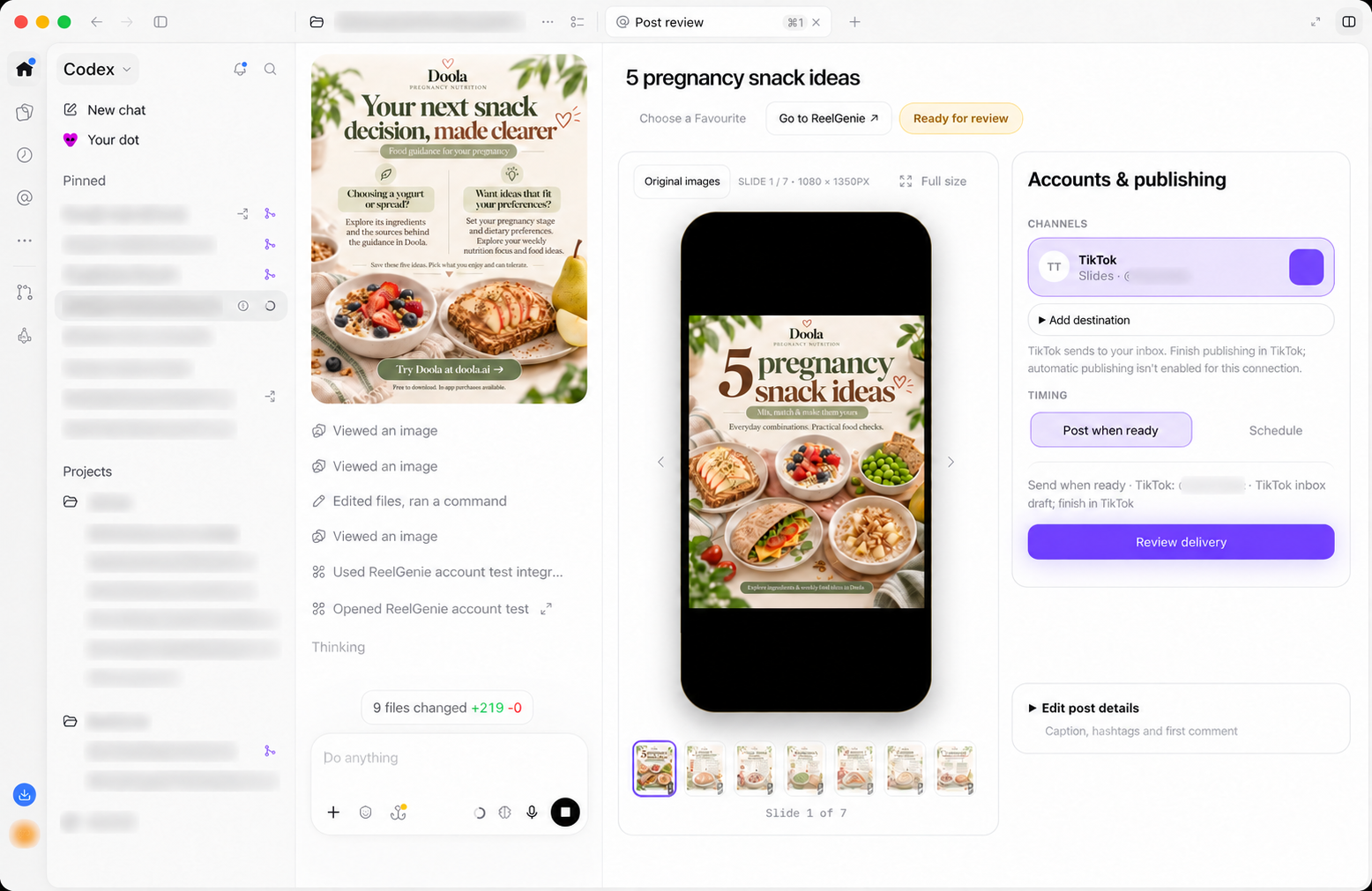
Codex workstation with a finished pregnancy snack carousel in the conversation beside ReelGenie’s seven-slide phone preview, connected social account and Review delivery controls.
A real Codex workstation · Finished creative, phone preview and publishing controls together. Cropped and edited for privacy.
03 · CHOOSE & APPROVE

The right account.
The right moment. Your approval.

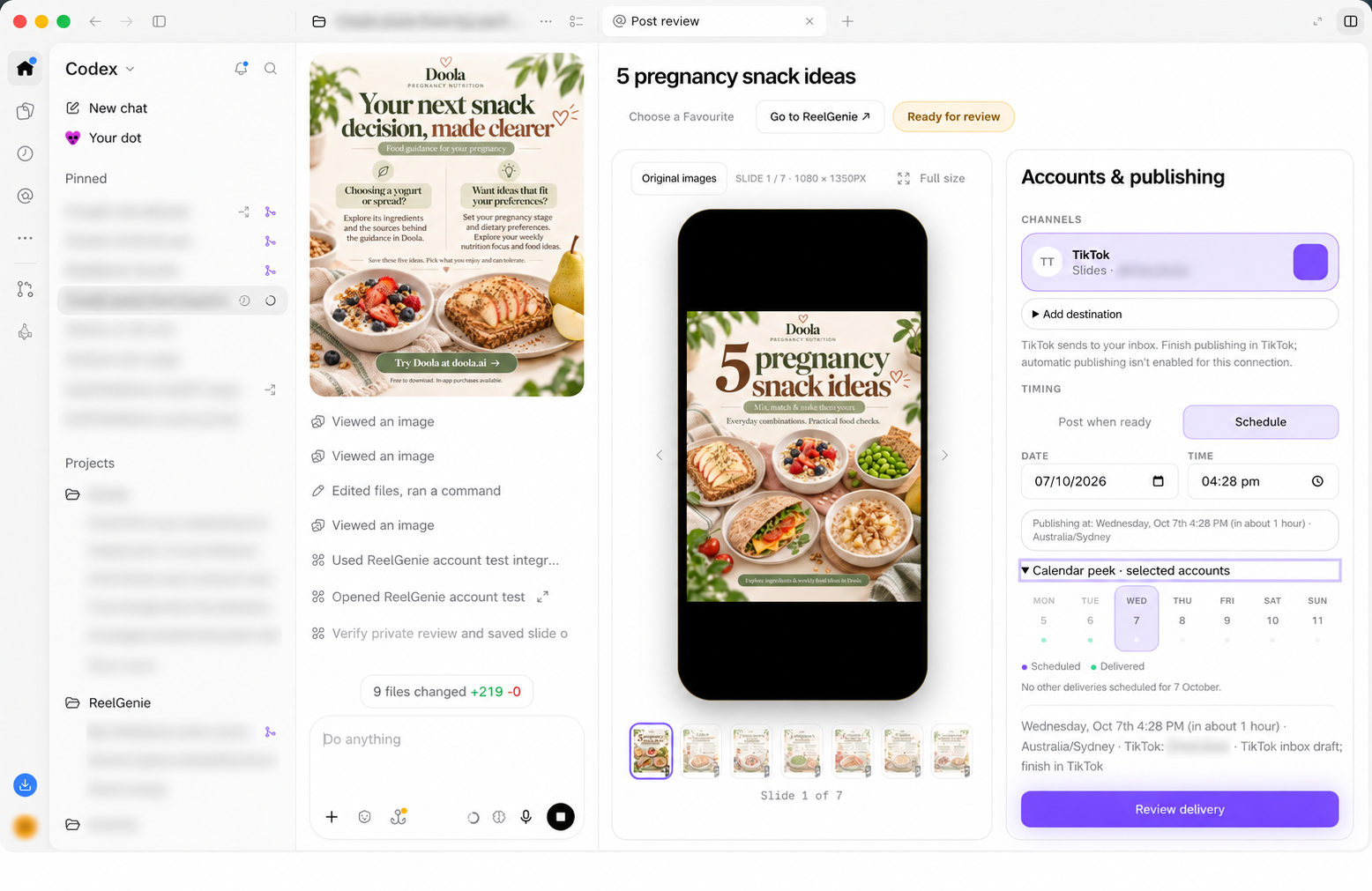
Select your connected social accounts. Publish when ready, or check the calendar and choose a date and time. Review the delivery plan before you approve it. Your post stays private until you authorise delivery.

The same pregnancy snack carousel inside the Codex workstation with ReelGenie’s phone preview, selected social account, scheduling date and time, calendar peek and Review delivery button.
The same post, before delivery approval · Choose an account and timing with the calendar in view. Cropped and edited for privacy.

Keep creating in conversation. Let ReelGenie handle the handoff to publishing.

Delivery depends on the connected platform and supported media. TikTok inbox drafts still need to be finished in TikTok.

A REAL PUBLISHING EXAMPLE

A finished post, with a delivery result you can check.

Our Doola carousel began with six original images and a caption made in Codex. ReelGenie kept the final Post together through review, approval and delivery.

  1. Saved for reviewSix original 1080 × 1350 images, in order, with one caption.
  2. Approved in CodexThe user confirmed Instagram @doola_us and a TikTok @mel.doola inbox draft.
  3. Results checkedInstagram reported publication. TikTok first received an inbox draft; its current record also reports a public post.

See the Instagram post ↗ · Read the decisions behind it →

Our own Doola workflow, checked 29 September 2026. TikTok drafts require completion in TikTok. This verifies delivery, not customer growth or time saved.

BRING THE RESULTS BACK TO THE CONVERSATION

Ask what worked.
Make the next post with that insight.

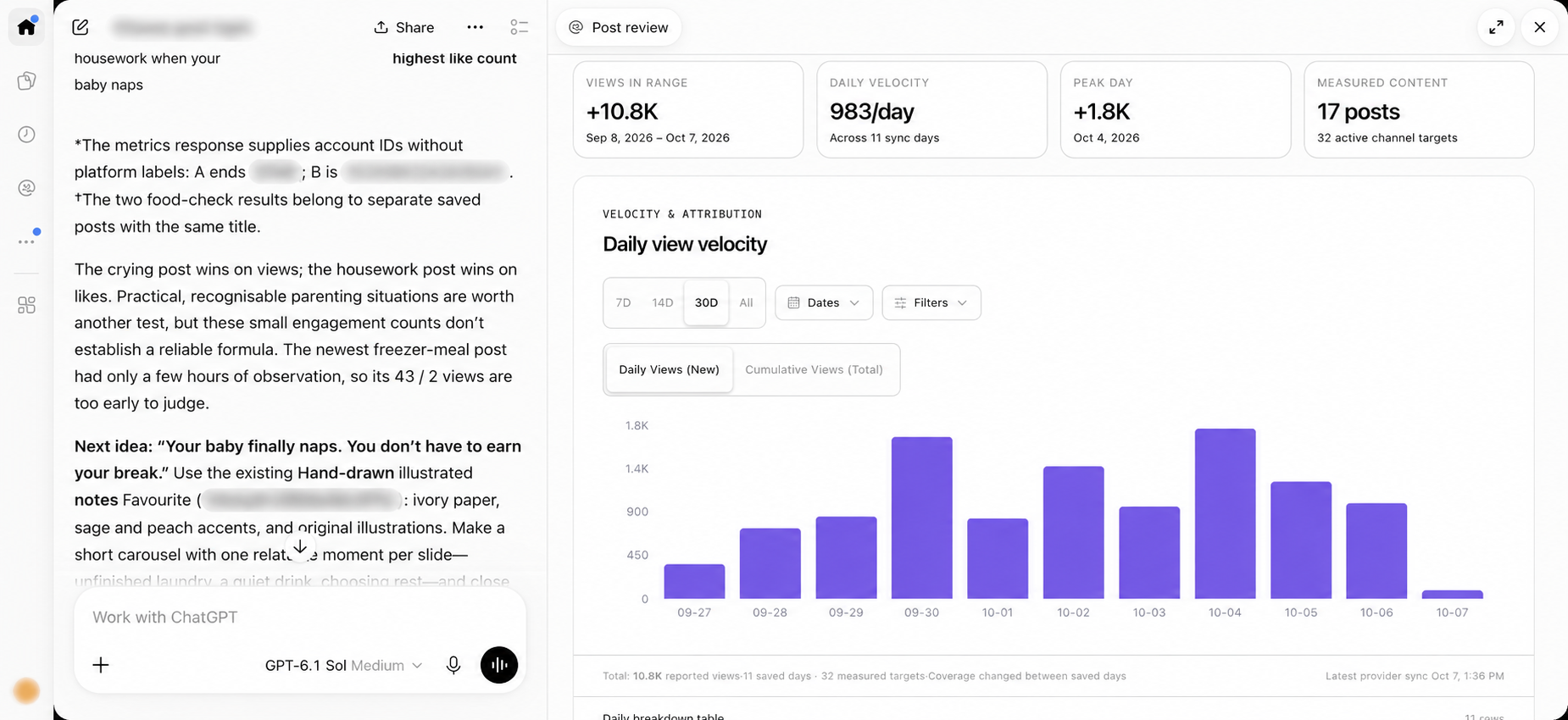
See saved daily results and individual post metrics beside your conversation. Ask AI to compare your actual posts, explain the available evidence, and suggest the next creative direction—using your ReelGenie history and Favourites.

Actual ChatGPT Work conversation comparing ReelGenie post results and suggesting a new idea using an existing Favourite, beside the embedded daily performance chart and measured-content summary.
ChatGPT Work capture, edited for privacy · Real post results beside the conversation that helps plan the next idea.
04 · ANALYSEAsk about your actual posts

“Which recent posts have the most engagement?”
“Compare the available results for our carousels and videos.”
“What creative patterns do the strongest posts share?”

05 · IMPROVETurn the findings into the next post

“Use those findings and this Favourite to prepare a new carousel.”

Review the suggested angle in the same conversation, create the post, and approve its delivery when it is ready.

Available metrics and their freshness vary by platform and account. AI can identify patterns and suggest experiments; a strong result does not prove what caused it.

Stay in conversation.
Go deeper when you need to.

Use the embedded views for references, post review, publishing and performance. Open the ReelGenie console for broader library, team and brand management.

THE REELGENIE CONSOLE

Open ReelGenie for the bigger picture.

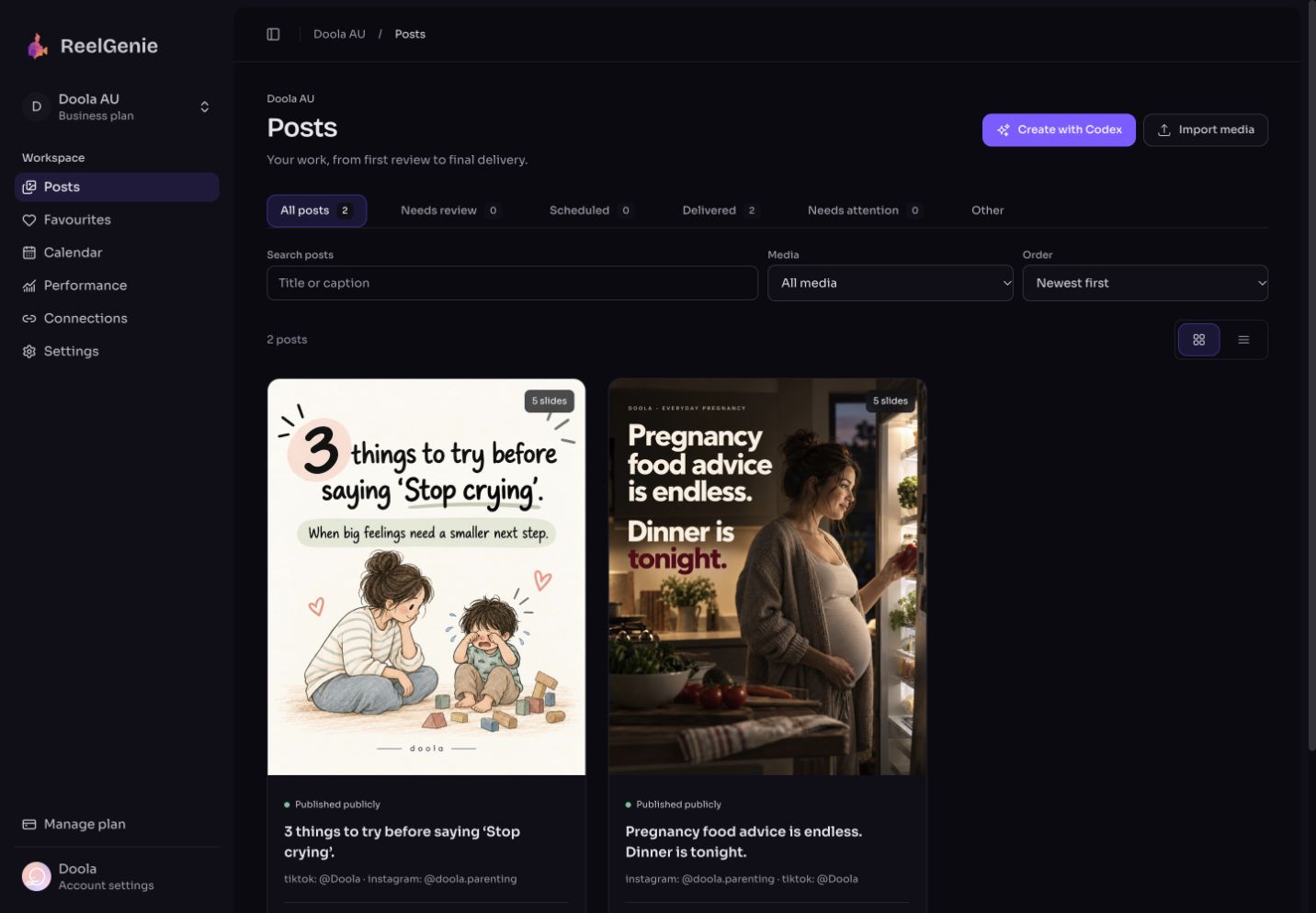
The “Go to ReelGenie” button opens your full console. Organise the wider post library, manage team access and keep each brand’s audience, voice and goals ready for AI to use in your next conversation.

Learn the multi-brand workflow
Actual ReelGenie workspace library showing a finished carousel and its publishing destinations

One approved post.
A clear result per account.

Instagram

Publish supported images and video directly to your connected account.

TikTok

Send an inbox draft. Finish and publish it inside TikTok.

YouTube

Publish finished video to your connected channel.

Available formats and delivery options depend on the account and platform permissions.

Start with one post. Keep going in conversation.

Create your free ReelGenie account and follow the connection walkthrough. Then ask AI to prepare a post for private review. Connect a social account when you are ready to deliver.

Help me create a social post and save it to ReelGenie for private review.

Sign in and authorise the connection first. You approve each delivery.

Read the full instruction

Help me create a social post for my audience. Use my ReelGenie brand guidance and a Favourite if useful, make the finished media and copy, and save the post for private review. Let me inspect the phone preview and choose the social accounts and timing before I approve delivery. After publishing, use the available ReelGenie performance data to help me understand the results and plan the next post. A TikTok inbox draft still needs completion in TikTok.

FREE FOREVER

Use the Codex plan you have. Use ReelGenie free forever.

ReelGenie's forever-free plan includes 10 posts per day and 2 workspaces. Create with Codex, review your finished post, and send it to your connected destination.

Free · $0/month

10 posts per day across your team. Up to 2 workspaces and unlimited connected accounts. A place to review finished media, adjust publishing details and follow delivery.

Start free

Pro · US$19/month or US$199/year

For teams sending more than 10 posts a day or managing more than 2 workspaces: unlimited posts, up to 10 workspaces and unlimited connected accounts. All features included. Save US$29 with annual billing.

Manage your plan

Free publishing resets at midnight UTC. One carousel counts as one post across its destinations; retries do not count again. Contact us for more than 10 workspaces. Your Codex subscription and image-generation limits are separate from ReelGenie. Platform permissions still apply. Read the Pricing Policy.

What you need to know before starting.

Is ReelGenie included with my Codex subscription?

No. Codex can help create the post using the tools and limits in your plan. ReelGenie is a separate publishing workspace with its own free plan. It connects to your AI workstation through an authorised ReelGenie integration. See the full workflow.

What does ReelGenie do?

ReelGenie connects content created in your AI workstation to social publishing and available performance data. It keeps finished media and copy together, lets you review posts and connected accounts, supports scheduling and delivery, and gives AI access to authorised data to help plan the next post.

Do I need to set everything up myself?

Create your ReelGenie account, follow the connection walkthrough and authorise access. Then ask AI to save a finished post for review. You sign in, connect your social accounts and approve delivery; you do not need to choose a workspace to get started. See the connection steps.

Where are the images generated?

Codex uses its image-generation tool to create original images from your agreed script and visual reference. ReelGenie stores the finished originals for review and delivery. Codex access and image-generation availability are separate from ReelGenie.

Can I review before anything is sent?

Yes. Check every slide, the complete copy, destination accounts, delivery mode and timing. Approval starts immediate delivery or scheduling. You can approve in the console or through your authorised AI connection. ReelGenie shows a separate result for each destination.

Can I reuse a reference for different brands?

Yes. Favourites belong to your team, so a saved visual approach can be reused across workspaces. Each workspace keeps its own audience, voice and goals. The reference guides the format; it does not force the new post to use the same topic.

Can AI analyse my ReelGenie data?

Yes. With an authorised connection, AI can retrieve post history and available performance metrics, compare results, and help turn observed patterns into new post ideas. Metrics depend on the platform and account, and missing data should not be treated as zero. Suggestions are hypotheses to test, not guaranteed improvements.

What about video and pricing?

You can import finished video for supported delivery paths. ReelGenie does not currently render or generate video. View your available plan in the console’s billing settings and read the Pricing Policy for billing terms.

From your first idea to your next better post.

Create, review and deliver your first post with ReelGenie. Then bring the results back to AI and keep improving—all in the workstation you already use.

Start free

Already signed up? Try the first-post prompt ↗

View full size