 ReelGenie
How to keep brand voices separate with Codex
Codex can follow instructions. The risk is selecting the wrong instructions when several brands, audiences or social accounts share one workflow. ReelGenie keeps a distinct, editable brief for each workspace and lets you select the one this Post belongs to.
Start free with ReelGenieFree includes up to 10 workspaces and unlimited connected accounts; one delivered Post per team per UTC day.
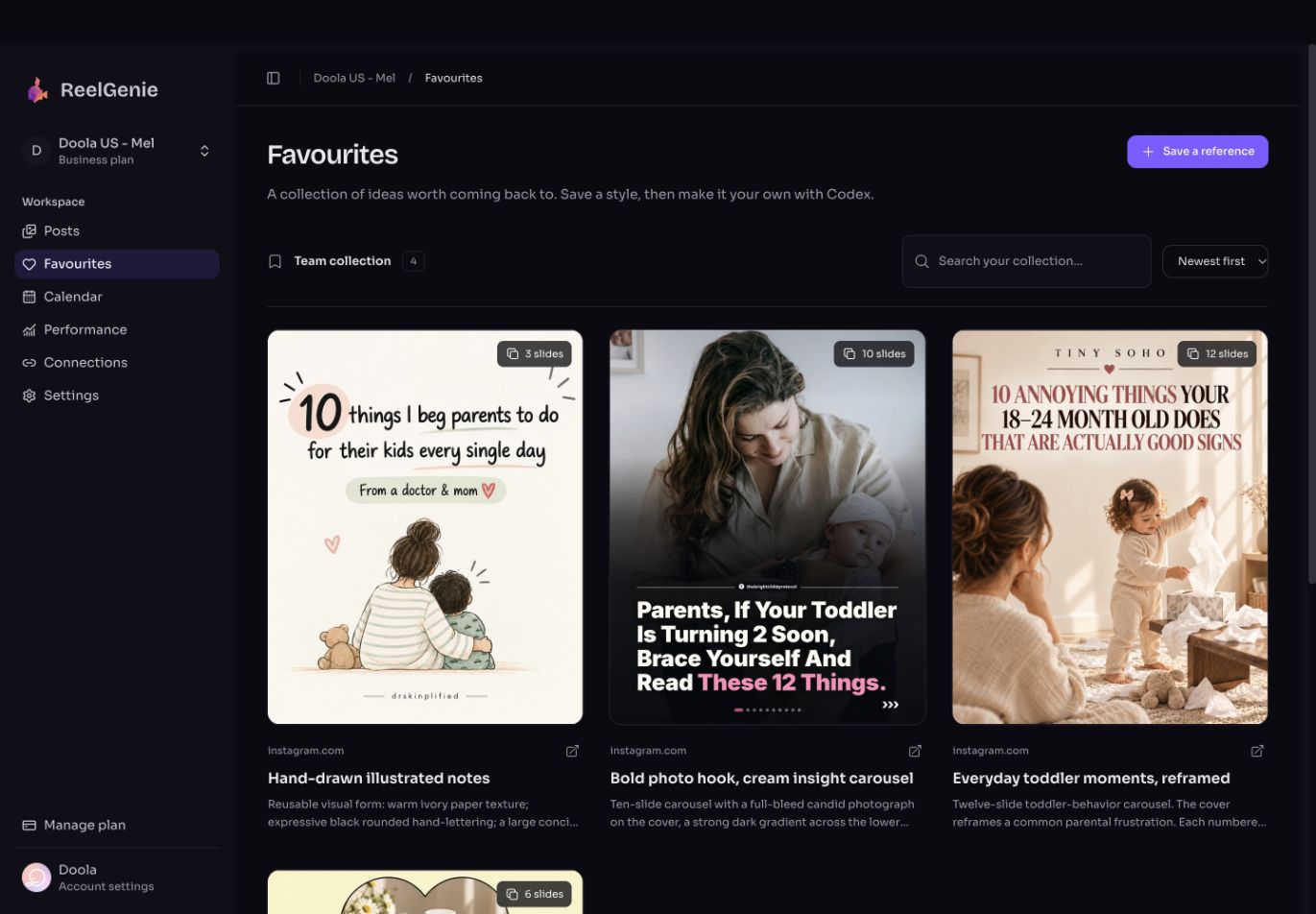
Keep brand instructions, one-post choices and visual references apart
Trying to put everything in one giant prompt is what makes accounts drift together. ReelGenie gives the recurring brand brief a stable home, while Codex handles a specific creative request. Favourites are a separate team collection of inspiration; they are not the authority for a brand's goal.
| Context | Contains | How long it lasts |
|---|---|---|
| Workspace profile | Audience, account purpose, primary goal, product facts, desired action, voice, visual guidance, language and boundaries. | Across posts until you explicitly update it. |
| Post brief | Today's topic, chosen angle, hook, first visual, campaign exception and destination. | For this Post only, unless you approve a profile change. |
| Team Favourite | A source post's visual rhythm, images, hook mechanism and reusable creative notes. | Reusable across team workspaces; it does not set a new brand's audience or claims. |
Codex can use its own project instructions and files. ReelGenie's advantage is making the selected brand context visible and retrievable through the same connection as the Post, account list and delivery status. The value is a clearer source of truth, not a claim that Codex has no memory.
One workspace or two?
Keep one workspace
Two social accounts represent the same brand, audience, goal and approval rules. Connect both destinations to that workspace, then choose the exact account for each Post. A carousel can go to selected eligible destinations after one review.
Separate workspaces
The accounts have different brands, audiences, offers, languages, voices or content boundaries. Give each its own saved profile so a switch in account also switches the creative brief. Name the workspace clearly enough to identify it at approval time.
A different handle alone does not require another workspace. A changed goal or set of factual claims often does. ReelGenie gives a new user a default workspace; add another only when the brief really differs.
Worked example: one style, two different posts
The following two brands are illustrative. Imagine a parenthood app and a local ceramics studio in the same team. Both could like a Favourite with warm ivory paper, hand-drawn notes and a three-step reveal. The Favourite supplies that form; it must not supply the parenthood topic, people or claim to the ceramics post.
| Field | Parenthood app | Ceramics studio |
|---|---|---|
| Audience | Parents seeking practical, calm everyday ideas. | Local beginners curious about trying a class. |
| Goal and action | Help a parent understand one useful idea; invite an app visit when relevant. | Make the first class feel approachable; invite a class booking. |
| Voice and boundary | Warm, precise, no unsupported health or development claims. | Hands-on and playful, no false scarcity or skill promises. |
| Use of Favourite | Hand-drawn parent activity with the reference's spacing and reveal. | Hand-drawn clay tools and hand movement with the same spacing and reveal. |
The images in the Favourite above are actual saved references. The ceramics adaptation is a teaching example, not a ReelGenie-generated or published Post. This distinction matters: a reusable style can travel, but people, topic, claims and call to action must come from the destination brand's brief.
A wrong-brand draft can sound polished
Continue the illustrative ceramics example. Suppose Codex proposes: “Make more room for small discoveries with your little one.” The line sounds warm and fits the Favourite’s mood, but it imports the parenthood app’s audience into a beginners’ ceramics class. Asking for “a more playful tone” would polish the mistake.
Correct the brief first: the reader is a local adult who has never used a pottery wheel; the post should lower uncertainty about a first class. A more relevant illustrative hook is: “Never touched a pottery wheel? Here’s what your first class actually looks like.” The interior should show arrival, guided practice and the beginner’s result, using only details the studio has confirmed. The closing action can then point to real class information.
The draft borrowed the other brand’s audience. For this ceramics Post, use the studio’s saved beginner audience and booking goal. Keep the Favourite’s spacing and illustrated style. Remove parent-and-child assumptions. Show me the revised hook and slide outline before generating again. Do not change either workspace’s saved profile.
The useful check is whether the post still makes sense when the logo is covered. If the audience, situation and next action fit another brand better, inspect the selected brief before editing adjectives. Neither version above is a recorded generated or published post.
When would this make Pro worthwhile?
Multiple brands alone do not require Pro: Free already includes up to ten workspaces. The practical limit is delivery volume across the team. Two brands needing different posts on the same UTC day require more than Free’s one-Post allowance. One carousel sent to several supported accounts still counts as one Post. Use the actual publishing calendar to decide; do not upgrade simply because you created a second workspace.
Make the workspace switch visible in Codex
Before scripting or images, ask Codex to list ReelGenie workspaces, select the exact one, retrieve its current content profile and list connected accounts for it. A workspace name alone is not the brief. If the audience, purpose, goal or desired action is missing, supply and approve that information before Codex saves it. When you switch brands later, ask for a fresh read rather than trusting the previous conversation's context.
Switch to the [exact workspace] ReelGenie workspace. Read its current content profile and list its connected accounts. Summarize the audience, goal, voice, boundaries and desired action you will use. Tell me which required fields are missing. Do not borrow instructions from my other workspace. Wait for my confirmation before changing saved guidance or generating images.
For a one-off campaign, say so explicitly: “Use this angle for this Post only; do not update the workspace profile.” If a voice or offer should change for future posts, approve a persistent profile update and ask Codex to read it back. A concurrent edit can make a saved revision stale; reread and reconcile instead of overwriting someone else's update.
Reuse a Favourite without bringing the wrong brand with it
Ask Codex to inspect the Favourite's actual cover, interior and closing images when available, not merely its title. Have it describe the source's lighting, typography, composition and slide rhythm, then propose a new topic for the selected workspace. Keep the source logo, exact wording, images and claims out of the new Post unless you supplied and authorized them.
For [exact workspace], read the saved profile and this team Favourite: [name]. Use its visual form and slide rhythm only. Propose two original topics that serve this workspace's audience and goal. For each, show the exact cover hook and first visual. Wait for my choice; then make one cover and one interior slide for review before completing the carousel.
After creation, open the private ReelGenie Post and check four things together: the workspace label, the complete media and caption, the destination handle, and the account's delivery mode. A perfectly branded Post sent to the wrong account is still a failed workflow.
If something feels like the wrong brand
Stop before approval. Ask Codex to identify whether the wrong workspace was selected, its profile was stale, a one-off exception was saved as permanent guidance, or a Favourite's subject was copied into the new post. Correct that source, regenerate only the affected creative, and inspect the private preview again. If the Post has already been approved or a provider has started work, do not quietly replace its media; use the product's review or separate-delivery path after checking the current state.
Decide when ReelGenie adds value, then follow the checked delivery workflow for the first Post. The connection guide covers skill, token and social-account setup.
Source and scope
The workspace, Favourite and approval rules above come from the ReelGenie V4 publishing skill and the actual Favourites console capture. The two-brand comparison is illustrative; it is a method for separating context, not a claim that either example Post was generated or delivered.