Free · $0/month
One post per day across your team. Up to 10 workspaces and unlimited connected accounts. A place to review finished media, adjust publishing details and follow delivery.
 ReelGenie
Create a TikTok slideshow with Codex, using your idea or a reference for direction. Review the original images and copy in ReelGenie. Start free with one post per day across your team, up to 10 workspaces and unlimited connected accounts.
Start free with CodexFree: 1 post/day · 10 workspaces · All features. Codex access is separate.
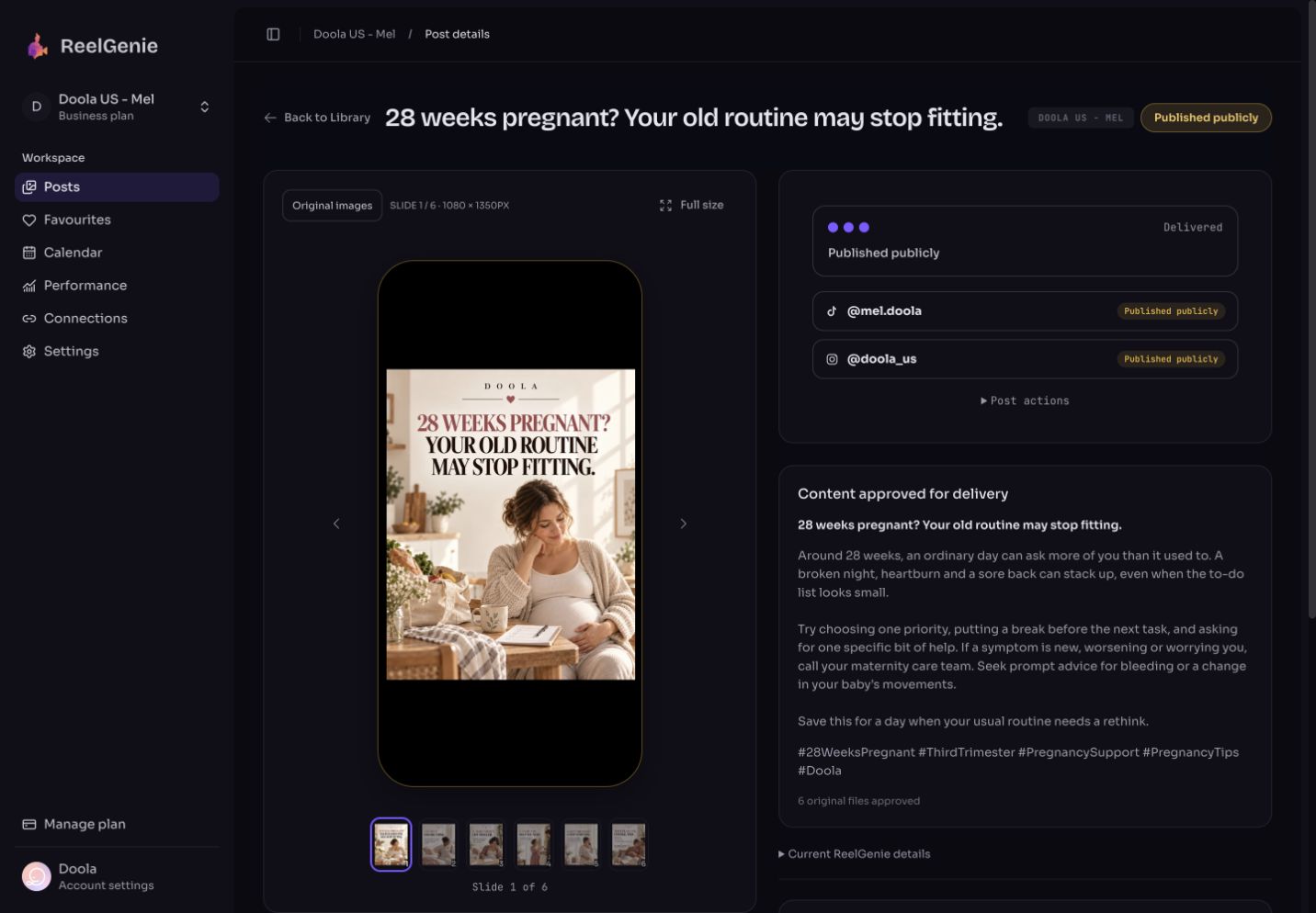
A TikTok slideshow is a swipeable photo post. If you already have finished images, you can assemble a photo post in TikTok. ReelGenie is useful when you want help creating original slides and copy, retaining your brand guidance, and reviewing delivery to a connected account.
Give Codex your audience, the purpose of the post and a reference you like. Agree on the angle and cover before generating a whole carousel.
Codex uses its image-generation tool for the finished slides. A saved Favourite can guide the layout, visual style and storytelling without forcing every new post to use the reference's topic.
Open the ReelGenie phone preview. Inspect every slide, title, caption and hashtag. Check the destination and timing. Changes to image content happen through Codex; the console edits publishing metadata.
For the TikTok inbox workflow, approval starts immediate delivery or schedules it. Once delivered, open TikTok to finish the post, including the available sound and publishing choices. “Delivered to inbox” does not mean publicly published.
Looking for a free TikTok slideshow maker or generator? ReelGenie provides the free publishing workspace; Codex provides the creative conversation and image generation. Access to Codex and its tools is separate. This is not an unlimited free image-generation offer.
You can also import finished images. When you connect a TikTok account, check its available delivery mode before approving. A paid ReelGenie plan does not remove platform restrictions.
Use references to discuss composition, pacing and emphasis. Write original wording and use images you create or have permission to use. Your workspace guidance helps Codex connect the subject to your product without turning every slide into an advertisement.
Publishing the same idea on Instagram? See the Instagram carousel workflow. Promoting a product? Explore app marketing examples.
A swipeable TikTok photo post is a sequence of still images. A slideshow video plays images on a timeline and is uploaded as a video. The workflow on this page creates finished images for the photo-post route; ReelGenie does not turn them into a rendered video.
You can use TikTok’s own posting flow without ReelGenie. Start a new post, choose your photos and review the available photo-post, sound, caption and privacy options in the app. See TikTok’s posting instructions for the current controls.
Use Codex and ReelGenie when you need an original script and images, a reusable reference style, saved brand guidance, or a review and scheduling workflow.
See an original carousel and its actual review result, or connect Codex and prepare your first post.
ReelGenie's free plan includes 1 post per day and 10 workspaces. Create with Codex, review your finished post, and send it to your connected destination.
One post per day across your team. Up to 10 workspaces and unlimited connected accounts. A place to review finished media, adjust publishing details and follow delivery.
Unlimited posts, up to 10 workspaces and unlimited connected accounts. All features included. Save US$29 with annual billing.
Free publishing resets at midnight UTC. One carousel counts as one post across its destinations; retries do not count again. Contact us for more than 10 workspaces. Codex access and image-generation availability are separate from ReelGenie. Platform permissions still apply. Read the Pricing Policy.
Paste it into Codex. It installs the skill and guides you from account setup to your first delivery.
You handle sign-in, account consent and final approval.
Codex, install and read the ReelGenie skill from https://reelgenie.app/reelgenie-codex-skill.md. Use your in-app browser to guide my ReelGenie setup, create and review my first post, then publish it and verify delivery. Keep my token private and confirm the exact account and delivery mode before sending.
May we use analytics cookies to understand visits and setup steps? Your choice does not affect the free plan. Cookie policy