 ReelGenie
An Instagram MCP server for Claude, Codex and Cursor
ReelGenie is a hosted Instagram MCP server at https://reelgenie.app/api/mcp/agent. Add it to Claude, Cursor or another MCP client, sign in, and connect an Instagram professional account in ReelGenie. Your agent saves finished carousels, Reels or Stories for review; nothing goes out until you approve. ReelGenie then publishes straight to Instagram, now or at your time.
ReelGenie’s forever-free plan includes 30 posts a month and 1 brand, with the MCP server included. Solo is US$19/month. Your agent’s own plan is separate.
Start free – 30 posts a month, no card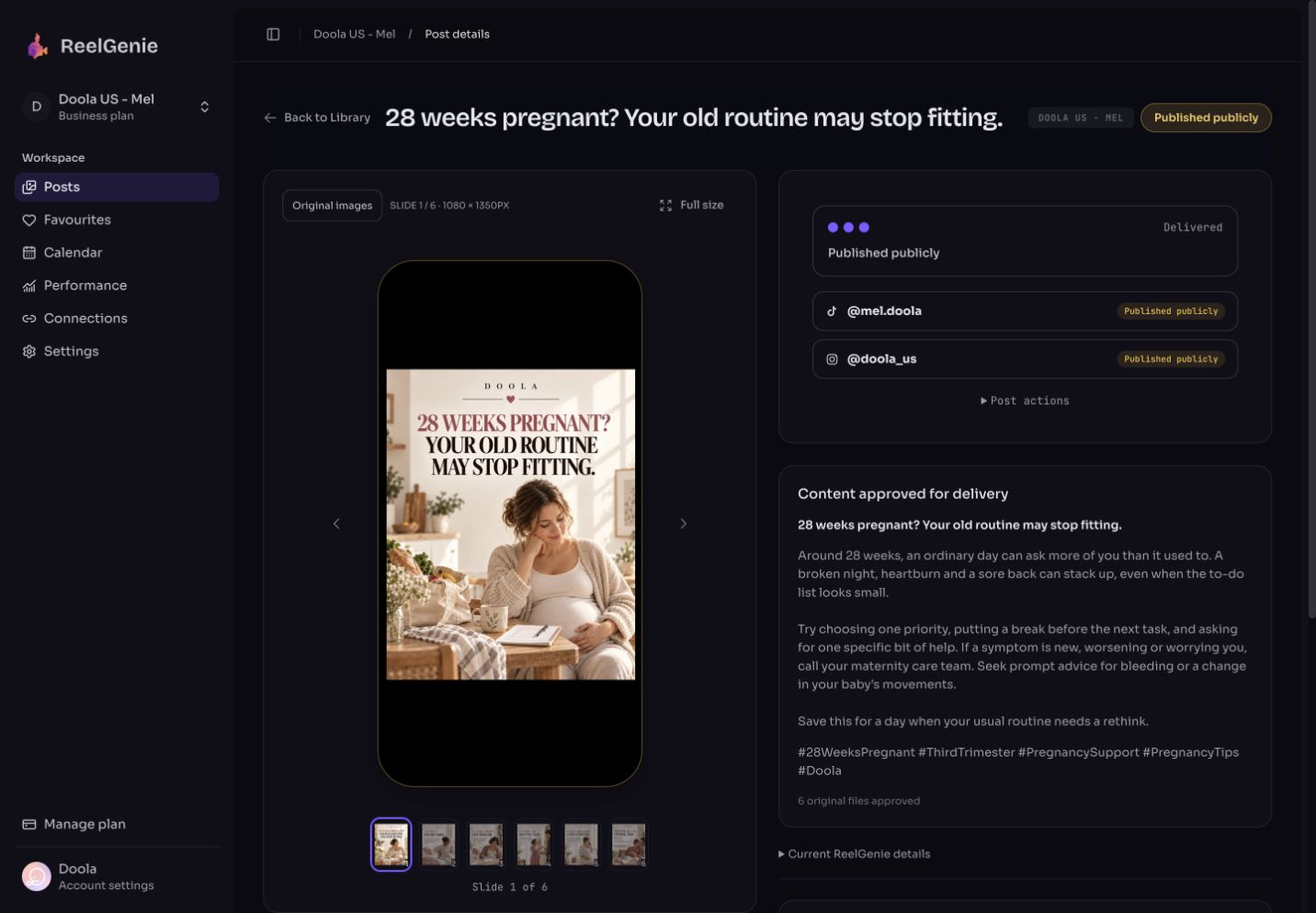
The short answer
- Create a free ReelGenie account.
- Add
https://reelgenie.app/api/mcp/agentto your agent and sign in. Codex uses a token instead. - Switch your Instagram account to a free creator or business account if it is personal, then connect it on ReelGenie’s Accounts page.
- Your agent makes the slides, or you bring finished photos or a Reel, and it saves the exact files for review.
- Check the post, then approve the account and time.
- See the result: Published, or Failed with Instagram’s reason.
What this Instagram MCP server does
An MCP server gives your agent tools it can call. This one lets Claude, Claude Code, Codex, Cursor or your own agent hand finished Instagram posts to ReelGenie, which keeps each one private until a person approves it and then publishes it through Instagram’s own publishing API. You approve every post before it goes live.
- Hosted: nothing to install or run, and no Meta developer app or API keys of your own.
- The same files: ReelGenie sends the files your agent uploaded, in order, not a copy made from a chat preview.
- Published, not a draft: Instagram gets the finished post at the time you approved. There is no draft to finish in the Instagram app.
- A result per account: Scheduled, Published or Failed with Instagram’s reason.
- Also TikTok and YouTube: the same server posts there too, as the TikTok MCP server and YouTube MCP server pages explain. Those are the only three platforms.
It is listed in the official MCP Registry as app.reelgenie/reelgenie.
1. Add the server to your agent
Create a free ReelGenie account first. Then pick your agent. Signing in opens a ReelGenie page that lists what the agent can do, including publishing after your explicit approval. Before it approves anything, your agent asks you in the chat and repeats the account and time. You can also approve in ReelGenie. To keep approval in ReelGenie only, connect with a token from the Agents page that leaves out publishing.
Claude desktop or web
Open Settings → Connectors, choose Add custom connector and enter the server URL. To upload images or video made in the chat, also open Settings → Capabilities, turn on Create and edit files and Use the internet while making files, add reelgenie.app under Allowed websites, then start a new chat. The Claude setup page has every step.
https://reelgenie.app/api/mcp/agentClaude Code
Install the ReelGenie plugin from the Claude setup page, or add the server directly, then choose reelgenie in /mcp to sign in.
claude mcp add --transport http reelgenie https://reelgenie.app/api/mcp/agentCursor, VS Code, Windsurf and other MCP clients
Any client that supports remote MCP servers with sign-in can use the same URL. In Cursor, add it to .cursor/mcp.json, then sign in when Cursor asks. The Cursor guide has every step. For GitHub Copilot in VS Code, the file is .mcp.json and the server needs "type": "http"; the VS Code guide shows it. In Windsurf, now called Devin Desktop, add it to ~/.config/devin/mcp_config.json or .devin/mcp_config.json and sign in; the Windsurf guide has the steps.
{ "mcpServers": { "reelgenie": { "url": "https://reelgenie.app/api/mcp/agent" } } }For a script or an agent that can’t sign in, a team admin can create a revocable token on ReelGenie’s Agents page.
Codex
Codex connects with a token from the Agents page, read from an environment variable so it stays out of the chat. The Codex setup page has a prompt that walks through it.
codex mcp add reelgenie --url https://reelgenie.app/api/mcp --bearer-token-env-var REELGENIE_MCP_TOKENChatGPT
The ReelGenie app for ChatGPT is in preview. See the plugin walkthrough for its current availability.
Then check the connection before making anything:
Check that the ReelGenie connection works and list my workspaces and connected social accounts.
2. Connect your Instagram professional account
Instagram lets apps publish only to professional accounts, so a personal account can’t be used. Switching to a creator or business account is free and takes a minute in the Instagram app. Your agent can’t sign in to Instagram for you: open ReelGenie’s Accounts page, choose Instagram and sign in there.
3. Make the post
Agree on the idea first. Your agent reads the workspace’s brand brief before it suggests anything.
Suggest three Instagram carousel ideas for [topic] that fit my brand brief. Give the cover line for each and recommend one.
- Text slides: your agent can lay out a hook, points, a quote and a closing slide through ReelGenie’s slide tool, in your brand colours, at 1080 × 1350 portrait or 1080 × 1920 for a Story. No image tool needed.
- Your own images: slides from your agent’s image tool, Canva or your camera roll, uploaded straight from disk.
- A Reel: a finished MP4 from your editor or a video tool. ReelGenie doesn’t make video, and neither does the server. A HeyGen, Canva or Higgsfield download link works too.
For carousels from start to finish, see the Instagram carousel page.
Carousels, Reels, Stories and sizes
- Carousel: 2 to 20 images, all the same shape. 1080 × 1350 portrait (4:5) takes up the most room in the feed. ReelGenie blocks approval if there are more than 20 or the shapes differ.
- Single image: one image in the feed.
- Reel: a vertical 9:16 MP4, for example 1080 × 1920, up to 500 MB. A video in the feed goes out as a Reel, and you choose the cover frame and whether it also shows in your feed.
- Story: one image or one video.
- Image files: JPEG, each up to 8 MB and 12 MB in total. ReelGenie warns before approval if a PNG or WebP image could be refused, so ask your agent for JPEGs.
- Caption: up to 2,200 characters and up to 30 hashtags.
- Extras: up to 3 collaborators (not for Stories) and alt text for each image.
4. Review and approve
Your agent uploads the files and saves the post as private. ReelGenie shows the slides or the Reel in a phone frame, in order, with the full caption and hashtags: the same files Instagram will receive.
Save these slides with the caption and hashtags as a private ReelGenie post and give me the review link. Don’t send anything yet.
Then tell your agent the Instagram account, feed or Story, and the time. It repeats those details back before anything is approved. You can also approve in ReelGenie instead.
Schedule this to my Instagram account for Thursday at 9:00 Sydney time. Confirm the details with me first.
Before approval, ReelGenie checks the delivery: it test-reads the files Instagram will fetch, checks the carousel and caption against Instagram’s limits, and warns you if the Instagram sign-in won’t last until the scheduled time.
5. Check whether it actually posted
Scheduled isn’t posted. Each account shows its own result:
- Scheduled: delivery is planned and nothing has been sent yet.
- Published: Instagram reports the post as live.
- Failed: Instagram’s reason, in plain words, and what to do next.
Did my Instagram post from this morning publish? If anything failed, tell me why and what to do.
If a post you scheduled never showed up, the missed post checklist walks through it.
The Instagram tools your agent gets
These are some of the server’s tools that an Instagram post uses, by their real names:
reelgenie_healthandlist_connected_accounts: check the connection and see which Instagram accounts are connected.create_slide_post: lay out text slides in your brand colours and save them for review.begin_finished_image_postandbegin_finished_video_post: upload your own finished images or Reel straight from disk.create_finished_video_post: save a video from a HeyGen, Canva or Higgsfield download link.get_posting_slots: read the account’s weekly posting times and next free slot.check_post_delivery: run the checks before approval.approve_post: approve the exact account, placement and time, only after you say yes.get_finished_postanddiagnose_publish_failure: read each account’s result and, if it failed, why.
Hosted server or your own Meta app?
Open-source Instagram MCP servers run on your computer and post with your own Meta developer app. That means setting the app up with Meta, getting Instagram’s publishing permission for it, and keeping the access tokens safe and fresh. It suits you if you want everything on your own machine.
A hosted server like ReelGenie skips that: you sign in to Instagram on ReelGenie’s Accounts page, and ReelGenie keeps the Instagram sign-in, holds each post for approval and records what Instagram answered. The trade-off is that it can’t be self-hosted. Compare ReelGenie with Blotato, Postiz and others.
What it can’t do
- It can’t post to a personal Instagram account. Instagram allows professional accounts only.
- It can’t sign in to Instagram for you. That step is yours.
- It doesn’t make photos or video. Use the slide tool, your own media, or a tool that makes them.
- It won’t send anything you haven’t approved: the post, the account and the time.
- Edits in ReelGenie don’t change a post that is already on Instagram.
- It posts only to TikTok, Instagram and YouTube.
Free forever. Paid plans when you need more.
ReelGenie’s forever-free plan includes 30 posts a month, 1 brand and 3 connected accounts, and the MCP server works on it. Posts saved for review don’t count, and one carousel counts as one post.
Forever free · $0/month
30 posts a month across your team, 1 brand and 3 connected accounts. No card needed.
Solo, Team or Agency · from US$19/month
Unlimited posts. Solo: 2 brands and 10 connected accounts for US$19/month. Team: 5 brands, 30 accounts and 5 people for US$49/month. Agency: 20 brands, 100 accounts and unlimited people for US$129/month.
Questions about the Instagram MCP server
- Can Claude post to Instagram by itself?
- No. Claude has no Instagram login, and Instagram only lets approved apps publish. With ReelGenie’s MCP server added, Claude hands over the finished post, you approve it, and ReelGenie publishes it to the Instagram account you connected.
- Is the Instagram MCP server free?
- Yes, on ReelGenie’s forever-free plan: 30 posts a month, 1 brand and 3 connected accounts, with no card. Solo is US$19/month for unlimited posts. Your agent’s own plan is separate.
- Does it work with a personal Instagram account?
- No. Instagram lets apps publish only to professional accounts. Switch to a free creator or business account in the Instagram app, then connect it in ReelGenie.
- Can it post Reels and Stories, not just carousels?
- Yes. It posts carousels of 2 to 20 images, single images, Reels from a finished MP4 up to 500 MB, and Stories of one image or one video. You choose feed or Story before you approve.
- Does it post without my OK?
- No. Saving a post keeps it private for review. Nothing is sent until the exact post, account and time are approved, by you in ReelGenie or by your agent after you say yes in the chat.
- Does it work with Cursor or my own agent?
- Yes. Any MCP client that supports remote servers with sign-in can use https://reelgenie.app/api/mcp/agent. A script that can’t sign in can use a revocable token from the Agents page.