 ReelGenie
How to schedule and publish social posts made in Codex
Finishing the images is not the same as publishing the post. The handoff has four checks: original files, a private review, an approved account and mode, and the actual destination result.
Start free with ReelGenieReelGenie is separate from Codex. You can prepare a private Post before connecting a social account.
There are four handoffs, not one upload
Downloading slides and posting them yourself forces you to remember which version is final, which caption belongs to it, which account should receive it, and whether the platform actually accepted it. ReelGenie gives each of those questions a visible answer. It preserves the finished media you submit; it does not repair weak images or write a better creative concept after upload.
A real delivery receipt: why “done” needs a destination
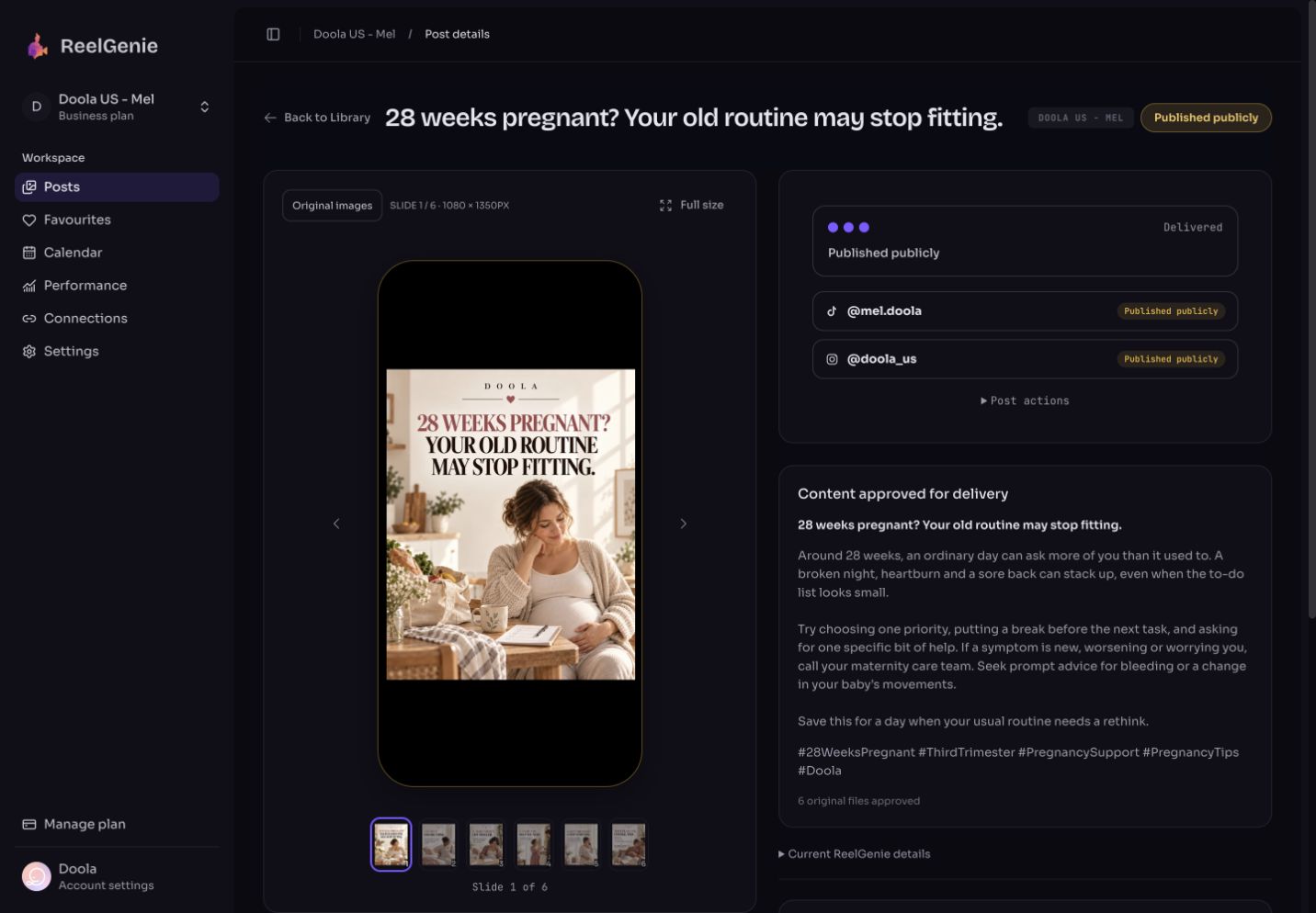
The Doola six-slide example passed all four handoffs. The following entries are from its stored history on 27 September 2026; times are UTC. They describe this run, not a promised delivery speed.
- 13:07:43 — explicit confirmation: the user authorized the reviewed carousel for Instagram @doola_us and TikTok @mel.doola as an inbox draft.
- 13:07:59 — TikTok draft delivery: the system recorded an inbox handoff. At this point, calling the TikTok post publicly published would have been wrong.
- 13:09:06 — Instagram publication: Instagram reported a successful public post. Inspect that carousel ↗
By the 29 September readback, both destination summaries reported a public post. That later TikTok state does not change the original mode: it went through the inbox workflow. We did not observe the in-app completion itself or establish its exact time.
A successful Instagram result does not justify resending the whole carousel when TikTok has a problem. Read the failed account’s reason first, keep the successful destination out of the retry, and check the new outcome. This is an illustrative recovery decision, not a failure recorded for this Doola post.
1. Prepare the assets for the destination
Before import, read every slide at phone size. Check the cover's hook, text accuracy, order, consistent visual treatment and caption claims. If Codex generated a misspelling, correct the image in Codex first. ReelGenie takes the finished bytes; it is not an image editor.
One image Post can contain 1–10 PNG, JPEG or WebP files, each at most 8 MB and 12 MB combined. If TikTok photo delivery is a target, use JPEG or WebP rather than PNG. For the current TikTok photo path, keep the short side at or below 1080 pixels and the long side at or below 1920 pixels; 1080 × 1350 is a suitable portrait example. These are ReelGenie's current V4 intake rules, not a promise that every social account accepts every format.
Codex can pass the actual finished files through the ReelGenie skill and MCP connection when that connection is working. That removes the manual download-and-reupload loop. If your Codex environment cannot reach ReelGenie, import the finished files in the console instead. Do not claim the handoff happened just because a skill was installed.
2. Stop at a private Post and inspect it
Ask Codex to create the Post for review, then read it back. The useful first result is a ReelGenie link in Ready for review, with the expected image count and order. Open the phone preview and inspect the real images and complete caption. If the caption or hashtags are wrong, edit and read back the updated Post. If a slide is wrong while the Post remains private and unqueued, replace that image and recheck the preview. Approval changes what can be safely edited, so do this before sending.
Use the finished six image files and caption for my [workspace] Post. Save a private ReelGenie Post for review. Read it back, confirm the slide order, and give me the preview link. Do not approve, schedule or publish it yet.
For a concrete example, see the original Doola six-slide carousel. Its cover and interior slide show how the same visual treatment carries a specific, original topic rather than copying a reference's wording.
3. Approve the exact account, mode and time
Read the connected-account list for this workspace. Check the account name and delivery capability; a saved connection is not proof that the provider will accept this particular media. Select the exact destination instead of relying on a default account. For a schedule, confirm an absolute time and timezone, not simply “tomorrow morning.”
Codex may create and edit a private Post with ordinary content permission. Sending through Codex requires a separate publish-execution permission and explicit human confirmation. Without that permission, request approval and finish in the ReelGenie console. Keep the MCP token private; do not paste it into a prompt, URL or shared document.
| Destination | What ReelGenie can do | What you still verify |
|---|---|---|
| Eligible Instagram account | Direct image or video delivery. | A published result for that account. |
| TikTok photo target | Deliver an inbox draft. | Draft arrival, then finish the public post in TikTok. |
| YouTube channel | Deliver a finished video. | A video result; image carousels are not the YouTube path. |
4. Interpret the result before calling the post done
| State | Meaning | Next action |
|---|---|---|
| Ready for review | The private Post exists. | Inspect and approve; nothing has been sent. |
| Scheduled or queued | Delivery is planned or processing. | Wait for a provider outcome; do not report publication. |
| Published | That destination reports a public result. | Open the platform link or account view when available. |
| Draft ready | TikTok received an inbox draft. | Open TikTok and finish publishing there. |
| Failed or unknown | No confirmed successful outcome for that target. | Diagnose the failure or reconcile the unknown state before retrying. |
Check each destination separately. One successful Instagram target does not make a TikTok draft public. A queued state does not make either target successful. If you need to change approved copy before provider work starts, return the Post to review and obtain fresh approval; do not quietly edit an already-sent Post.
Use the smallest complete first run
Choose one workspace, one finished carousel and one connected account. Reach a private Post, inspect it, approve the exact delivery and read the actual outcome. That one result tests the real integration. Expand to another account only after you know how the first destination behaves.
Connect Codex to ReelGenie for setup, or read the multi-brand guide before adding more workspaces. ReelGenie's free plan allows one delivered Post per team per UTC day; a carousel sent to selected destinations counts once. Private review Posts and Favourites do not consume that delivery allowance. For a scheduled free-plan Post, the allowance is checked on the actual dispatch day; if it is used, resolve the returned limit rather than duplicating or blindly retrying the Post.
Source and scope
Product steps and limits reflect the ReelGenie V4 publishing skill and the recorded console example shown above. Your account's displayed capability and observed delivery result are authoritative for a live post. Codex tool availability and usage vary by plan; see OpenAI's Codex plan guide.