 ReelGenie
How to post to Instagram from Claude
ReelGenie’s forever-free plan includes 30 posts a month and 1 brand. Solo is US$19/month. Your Claude plan is separate.
Claude can’t post to Instagram on its own. Connect it to ReelGenie and it can: Claude makes the carousel and writes the caption, ReelGenie keeps the post private and shows it exactly as Instagram will, and nothing is sent until you approve. Afterwards you can see whether it actually posted on each account.
The short answer
- Add ReelGenie to Claude as a connector and sign in.
- Connect your Instagram professional account in ReelGenie.
- Ask Claude for a carousel, a Reel or a Story.
- Open the review link and check every slide and the full caption.
- Tell Claude the account and the time, then approve.
- Ask Claude, or look in ReelGenie, whether Instagram published it.
1. Connect Claude to ReelGenie
Create a free ReelGenie account first. Then, in the Claude desktop or web app, open Settings → Connectors, choose Add custom connector and enter:
https://reelgenie.app/api/mcp/agentClaude opens a ReelGenie page that lists what Claude can do, including publishing after your explicit approval. Sign in and connect. Before it approves anything, Claude asks you in the chat and repeats the account and time. You can also approve in ReelGenie.
To upload images or video made in the chat, also open Settings → Capabilities, turn on Create and edit files and Use the internet while making files, add reelgenie.app under Allowed websites, then start a new chat. The Claude setup page has every step.
Using Claude Code in a terminal? Install the ReelGenie plugin instead, as shown in the Claude Code guide.
Check that the ReelGenie connection works and list my workspaces and connected social accounts.
2. Connect your Instagram account
Claude can’t sign in to Instagram for you. Open ReelGenie’s Accounts page, choose Instagram and sign in there. Instagram only lets apps publish to professional accounts, so switch a personal account to a creator or business account in the Instagram app first. It’s free.
Each ReelGenie workspace can hold its own Instagram, TikTok and YouTube accounts and a short brand brief, so Claude knows which brand it is writing for.
3. Make the post in Claude
Ask Claude for two or three ideas first, then pick one. Claude reads the workspace’s brand brief before it suggests anything.
Suggest three Instagram carousel ideas for [topic] that fit my brand brief. For each, give the cover hook and what the first slide shows. Recommend one.
Then choose how the post is made:
- Text slides in your brand colours: Claude can lay out tips, lists, quotes and a closing slide through ReelGenie, with no image tool needed. The text comes out exactly as you approved it.
- Your photos: share them with Claude or upload them on ReelGenie’s Posts page.
- A Reel: bring a finished MP4. Claude doesn’t make video itself.
Instagram limits: 1 to 20 images per carousel, each up to 8 MB and 12 MB in total. 1080 × 1350 portrait suits most carousels. A Story is one image or one video.
4. Preview the exact post
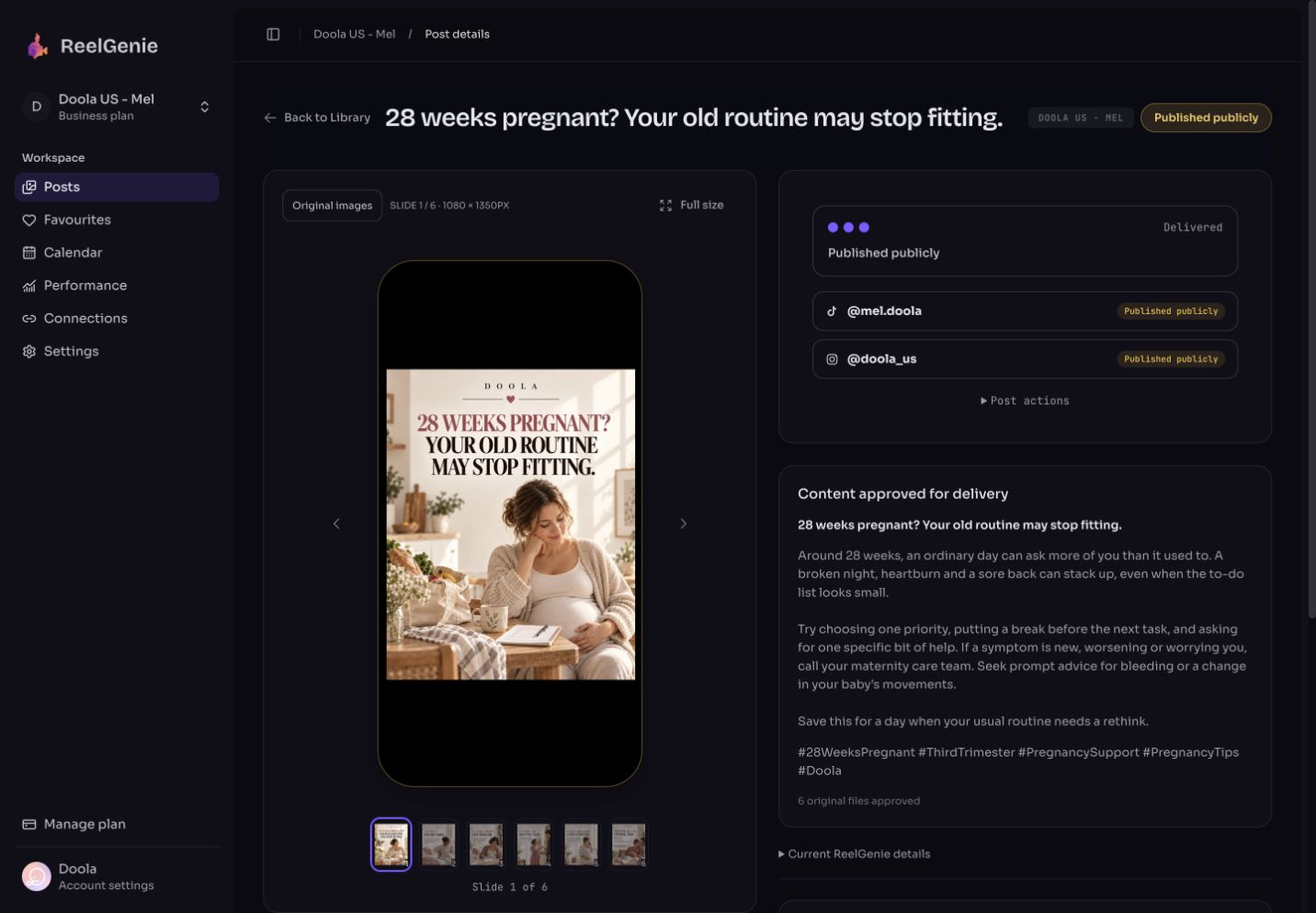
Claude saves the post as private and gives you a review link. ReelGenie shows the slides in a phone frame, in order, with the full caption and hashtags. This is what Instagram will receive.
Save this as a private ReelGenie post with the caption and hashtags, then give me the review link. Don’t schedule anything yet.
Fix anything in the conversation or edit the caption in ReelGenie. You can also choose feed or Story, add up to 3 collaborators and alt text for each image, and for a Reel pick the cover frame and whether it also shows in your feed.
5. Approve and schedule
Tell Claude which account should get the post and when. Claude repeats the exact account, the delivery and the time back to you, so you approve every post before it goes live.
Schedule this to my Instagram account for Thursday at 9:00 Sydney time. Confirm the details with me first.
Before approval, ReelGenie checks the delivery. It warns you if the Instagram sign-in won’t last until the scheduled time, so a post doesn’t quietly miss its slot because a connection expired. Reconnect the account, then approve.
6. Check whether it actually posted
Scheduled isn’t posted. After the time passes, each account shows its own result:
- Scheduled: delivery is planned and nothing has been sent yet.
- Published: Instagram reports the post as live.
- Failed: Instagram’s reason is shown, in plain words, so you know what to fix.
Did my Instagram post from this morning publish? If anything failed, tell me why and what to do.
After 24 hours Claude can also read the post’s views and likes against your account’s usual results. Treat that as how this post did compared with your own recent posts, not as proof of growth.
What Claude can’t do here
- It can’t connect or sign in to your Instagram account. You do that on ReelGenie’s Accounts page.
- It doesn’t generate photographs or video. Bring your own, or connect a tool that makes them.
- It won’t send anything you haven’t approved: the post, the account and the time.
- It can’t publish to a personal Instagram account. Instagram only allows professional accounts.
The free plan covers 30 posts a month across your team, 1 brand and 3 connected accounts. A post sent to several accounts counts once. Solo is US$19/month for unlimited posts. Compare plans.