Free · $0/month
One post per day across your team. Up to 10 workspaces and unlimited connected accounts. A place to review finished media, adjust publishing details and follow delivery.
 ReelGenie
Build posts around your audience’s real interests. Use Codex for the hook, script and visuals, then review and deliver through ReelGenie.
Start free with CodexFree: 1 post/day · 10 workspaces · All features. Codex access is separate.
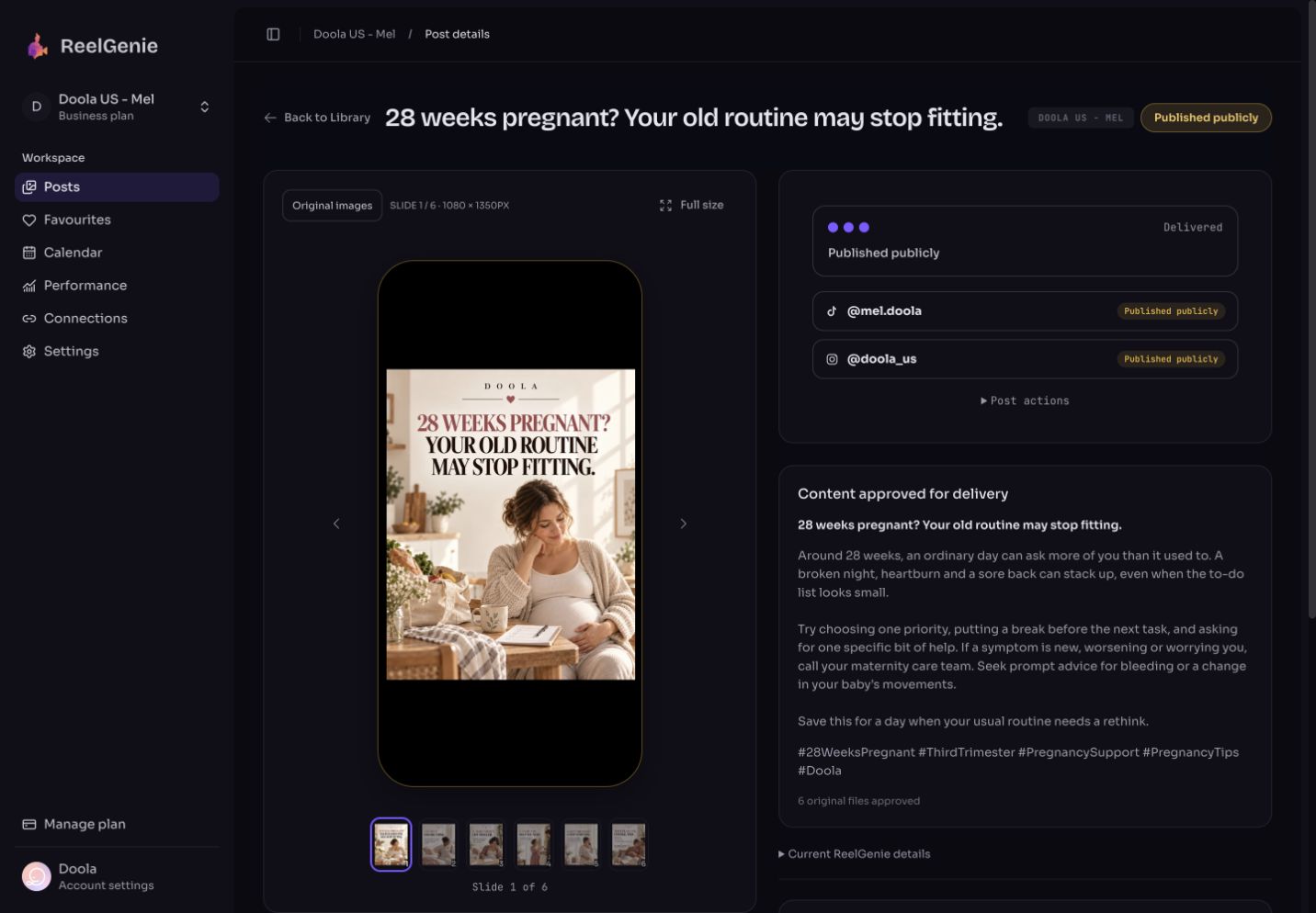
For Doola, a pregnancy and parenting app, we used a saved cream-and-rose editorial reference to guide the look of a new six-slide carousel. The topic and wording were developed separately: “28 weeks pregnant? Your old routine may stop fitting.”


3. Review and deliver. The finished post was reviewed in ReelGenie and its destination results recorded in the console. Inspect the actual review and delivery screenshot.
This example demonstrates the creation and delivery workflow. It is not evidence of increased reach, sales or app installs. The phone preview shows the original image, not an exact simulation of platform overlays.
Your app is the reason you are posting. It does not need to be the subject of every slide. Store the workspace's audience, product facts, voice and desired next step, then ask Codex for a useful topic that connects naturally to that goal.
For Doola, the workflow has been used to prepare pregnancy and parenting carousels. For Lumo, family creativity and coloring provide different directions. These are examples of content creation and delivery; we are not claiming measured growth in downloads or purchases.
Share a relevant post or research a question your audience asks. Separate the topic from the visual reference: a favourite toddler post can inspire the format of a pregnancy carousel without carrying over its subject.
Ask Codex for a clear audience cue, concrete tension and a useful payoff. Review the proposed first-screen visual alongside the headline. Do not add statistics unless they have a reliable source.
Each slide should explain something the reader can recognize or use: why a problem happens, an overlooked tradeoff, or a practical next step. Connect the app only where its actual function helps.
Inspect the generated images, complete copy, exact destination and timing. Approve in ReelGenie or through Codex. Follow the result for each account, including the final TikTok step when using inbox delivery.
A delivered post proves that the publishing workflow worked. It does not prove acquisition. Measure the path from post exposure to profile visits, app-page visits, downloads and activation, using attribution your product can actually support.
Compare topics and hooks over a reasonable sample. Keep platform metrics separate from app outcomes, and don't infer that a successful post caused every install that day. ReelGenie is a way to create and deliver the experiment, not a guarantee of viral reach.
Both plans include 10 workspaces and unlimited connected accounts. Free includes one post per day per team; Pro includes unlimited posts for US$19/month or US$199/year. Team Favourites preserve reusable creative direction, while each workspace keeps its own guidance.
Explore TikTok slideshow creation, Instagram carousels, or set up Codex for your first post.
ReelGenie's free plan includes 1 post per day and 10 workspaces. Create with Codex, review your finished post, and send it to your connected destination.
One post per day across your team. Up to 10 workspaces and unlimited connected accounts. A place to review finished media, adjust publishing details and follow delivery.
Unlimited posts, up to 10 workspaces and unlimited connected accounts. All features included. Save US$29 with annual billing.
Free publishing resets at midnight UTC. One carousel counts as one post across its destinations; retries do not count again. Contact us for more than 10 workspaces. Codex access and image-generation availability are separate from ReelGenie. Platform permissions still apply. Read the Pricing Policy.
Paste it into Codex. It installs the skill and guides you from account setup to your first delivery.
You handle sign-in, account consent and final approval.
Codex, install and read the ReelGenie skill from https://reelgenie.app/reelgenie-codex-skill.md. Use your in-app browser to guide my ReelGenie setup, create and review my first post, then publish it and verify delivery. Keep my token private and confirm the exact account and delivery mode before sending.
May we use analytics cookies to understand visits and setup steps? Your choice does not affect the free plan. Cookie policy