 ReelGenie
How to post to TikTok from Claude
ReelGenie’s forever-free plan includes 30 posts a month and 1 brand. Solo is US$19/month. Your Claude plan is separate.
Claude can’t post to TikTok on its own. Connect it to ReelGenie and it can: Claude writes the slides and the caption in the chat, ReelGenie keeps the post private and shows it as TikTok will receive it, and nothing is sent until you approve. For most accounts today TikTok receives the post as a draft, so you open TikTok, add a sound and post. Afterwards you can see whether it actually posted.
The short answer
- Add ReelGenie to Claude as a connector and sign in.
- Connect your TikTok account in ReelGenie.
- Ask Claude for a photo carousel, or upload your own photos or video in ReelGenie.
- Open the review link and check every slide and the full caption.
- Approve the account and time. Nothing is sent before that.
- When it says “Draft ready”, open TikTok, add a sound and post.
1. Connect Claude to ReelGenie
Create a free ReelGenie account first. Then, in the Claude desktop or web app, open Settings → Connectors, choose Add custom connector and enter:
https://reelgenie.app/api/mcp/agentClaude opens a ReelGenie page that lists what Claude can do, including publishing after your explicit approval. Sign in and connect. Before it approves anything, Claude asks you in the chat and repeats the account and time. You can also approve in ReelGenie.
To upload images or video made in the chat, also open Settings → Capabilities, turn on Create and edit files and Use the internet while making files, add reelgenie.app under Allowed websites, then start a new chat. The Claude setup page has every step.
Using Claude Code in a terminal? Install the ReelGenie plugin instead, as shown in the Claude Code TikTok guide.
Check that the ReelGenie connection works and list my workspaces and connected social accounts.
2. Connect your TikTok account
Claude can’t sign in to TikTok for you. Open ReelGenie’s Accounts page, choose TikTok and sign in there. The account card shows what ReelGenie can do with it: send drafts to your TikTok inbox, and Direct Post only where TikTok allows it.
3. Make the post in Claude
Ask for a few ideas first. Claude reads your workspace’s brand brief before it suggests anything.
Suggest three TikTok photo carousel ideas for [topic] that fit my brand brief. Give the opening line on the first slide for each and recommend one.
Then choose how the post is made:
- Text slides in your brand colours: Claude lays out a hook, tips, a quote and a closing slide through ReelGenie’s slide tool, at 1080 × 1920 so they fill the screen. No image tool is needed, and the slides come out as JPEGs TikTok accepts.
- Your photos: upload them on ReelGenie’s Posts page and ask Claude to write the caption. TikTok needs JPEG or WebP, at most 1080 × 1920; PNG can’t go to TikTok.
- Video: upload a finished MP4, up to 500 MB, on the Posts page, at 23 to 60 frames per second (30 is safe); TikTok refuses other frame rates. Claude doesn’t make video itself.
4. Preview the exact post
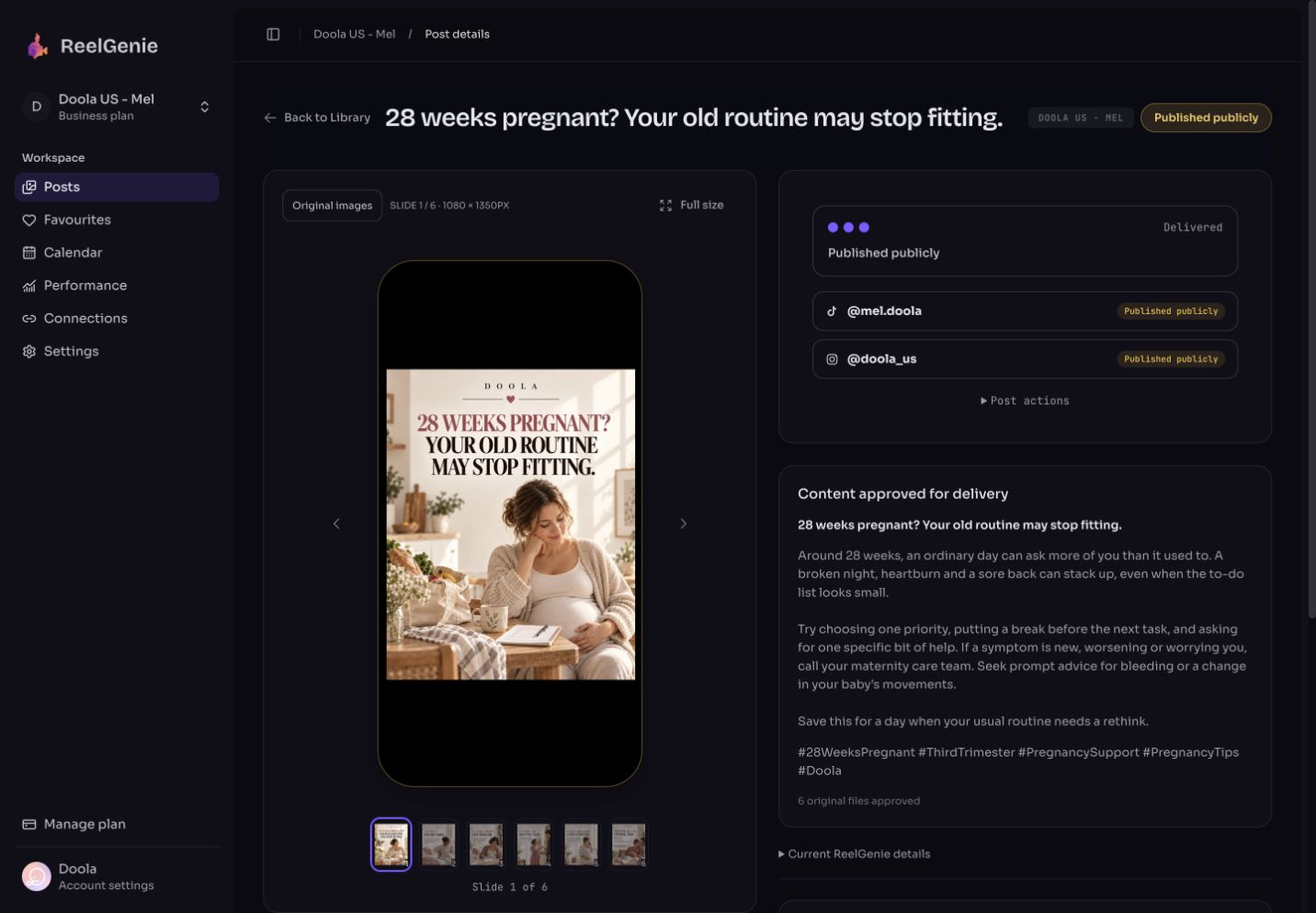
Claude saves the post as private and gives you a review link. ReelGenie shows the slides in a phone frame, in order, with the full caption and hashtags.
Make these slides as a private ReelGenie post with the caption and hashtags, then give me the review link. Don’t send anything yet.
Fix anything in the conversation or edit the caption in ReelGenie.
5. Approve the delivery
Tell Claude the TikTok account, the time and how it should be delivered. Claude repeats those details back before anything is approved, so you approve every post before it goes live.
Send this to my TikTok account as a draft on Friday at 18:00 Sydney time. Confirm the details with me first.
Before approval, ReelGenie checks the delivery. It warns you if the TikTok sign-in won’t last until the scheduled time, or if a TikTok daily limit is already used up for that day.
Draft ready or Direct Post?
TikTok decides which of these an app may use for your account. ReelGenie shows both honestly.
- Draft (most accounts today): ReelGenie sends the post to your TikTok inbox and the result reads Draft ready. That isn’t published yet. Open TikTok, add a sound if you like, edit and post. TikTok holds at most 5 waiting drafts per account, so post or delete older ones.
- Direct Post: appears only when TikTok has enabled it for your account. You choose who can view the post (there is no default), whether to allow comments, Duet and Stitch (each off unless you turn it on), whether it promotes a brand, and whether to add TikTok’s AI-generated label. Posting means you agree to TikTok’s Music Usage Confirmation.
If the Accounts page only offers inbox drafts for your account, every TikTok delivery from Claude arrives as a draft. Sounds can’t be added through TikTok’s API, so a draft is also how you post with a trending sound.
6. Check whether it actually posted
Scheduled isn’t posted. Each account shows its own result:
- Scheduled: delivery is planned.
- Draft ready: the post is in your TikTok inbox and needs your final step.
- Published: TikTok reports the post as live.
- Failed: TikTok’s reason is shown in plain words. A daily limit (for example the 5-draft inbox) is not retried automatically; the message says when to send again.
What happened to my TikTok post? Tell me the result for each account and what I need to do next.
What Claude can’t do here
- It can’t sign in to TikTok or finish a draft inside the TikTok app. Those steps are yours.
- It doesn’t generate photographs or video. Use the slide tool, your own media, or a tool that makes them.
- It won’t send anything you haven’t approved: the post, the account, the delivery and the time.
- It can’t turn on Direct Post. TikTok decides that for each account.
The free plan covers 30 posts a month across your team, 1 brand and 3 connected accounts. Posts saved for review don’t count. Solo is US$19/month for unlimited posts. Compare plans.