Forever free · $0/month
30 posts a month across your team, 1 brand and 3 connected accounts. A place to review finished media, approve it and follow delivery.
 ReelGenie
Claude, Codex or you save a finished video or images. Nothing goes out yet. A person on your team sees the exact file, caption and settings for each account, approves each delivery, and then sees what happened on every account.
See how it worksForever free: 30 posts a month · 1 brand · 3 connected accounts. TikTok, Instagram and YouTube.
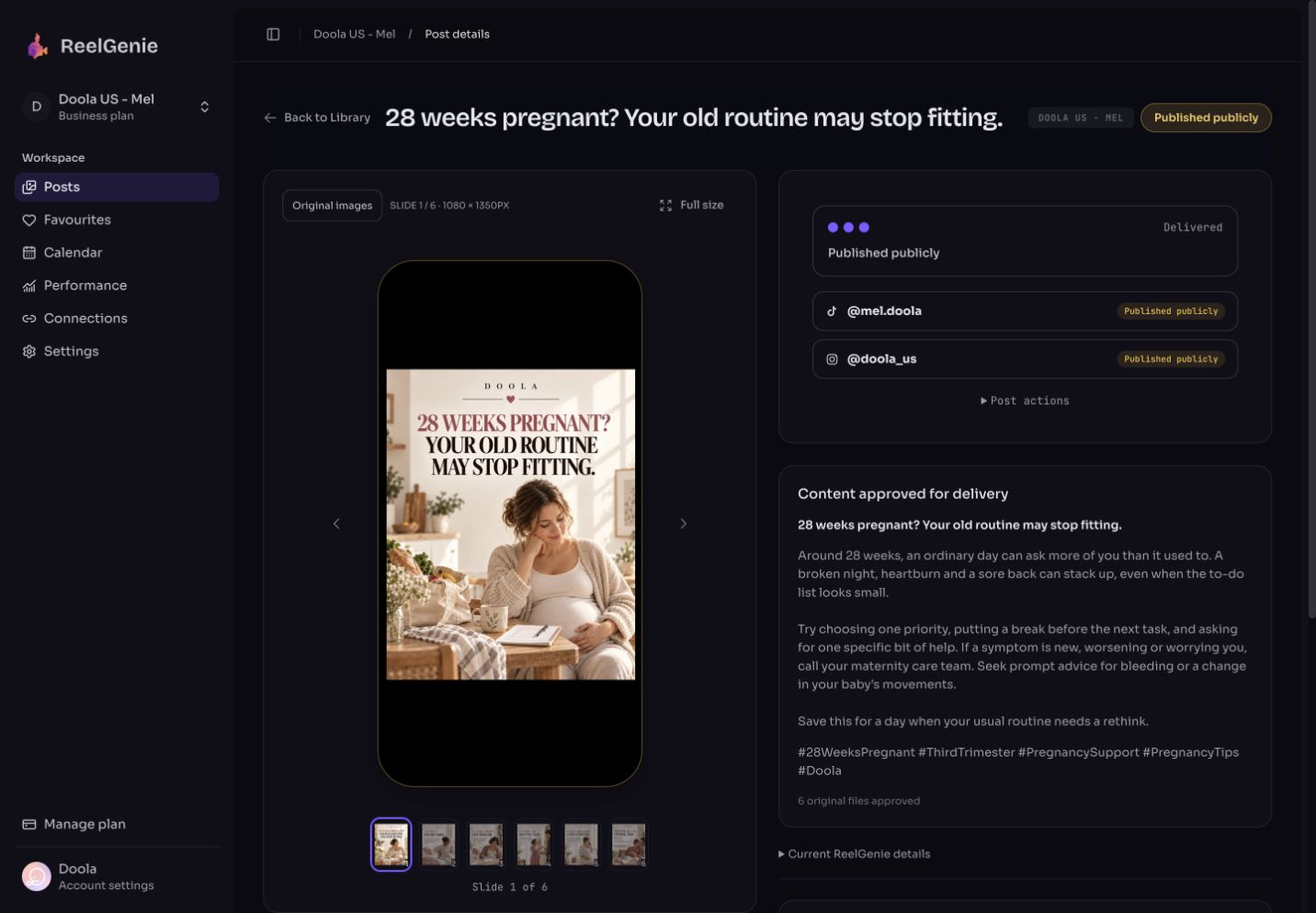
ReelGenie doesn’t make or edit videos. It posts finished ones, only to TikTok, Instagram and YouTube. Saving never publishes: a saved post waits, private, for review. An owner or admin of your team sees the exact files, the caption and each account’s settings, then approves each delivery. If the files, caption, accounts or time change after approval, ReelGenie doesn’t send the post until someone approves it again. Each account then shows its own result.
Claude, Claude Code, Codex or you upload the finished MP4 or images to ReelGenie with a title, caption and hashtags. ReelGenie checks the file and keeps a fingerprint of it. The post waits for review; nothing is sent.
The post shows the original video or images in a phone frame, the caption, title and hashtags, and the checks for each account you pick. What you watch is the file that will be sent.
Choose the exact TikTok, Instagram and YouTube accounts, the settings for each one, and post now, at a time, or at each account’s next free posting time. Review the delivery, then confirm it.
At the posting time, ReelGenie compares the post with what was approved. If the files, caption, accounts, TikTok mode or time changed, it sends nothing and asks for a new approval.
Every account gets its own row on the post: Live, In TikTok inbox, Failed with the platform’s reason, and so on. Delivery health lists every recent send.
After approval, the post shows the approved copy. To change it, choose Return to review to edit, then approve it again.
Check these before you approve. TikTok Direct Post can’t be approved until someone chooses who can view the post, including when Claude or Codex approves after your confirmation. Settings you leave alone keep their defaults: YouTube posts are public, and made for kids follows your channel’s default.
Approval means a person has seen and chosen each post. It doesn’t change how TikTok, Instagram or YouTube treat it. Each platform decides what counts as reused, repetitive or inauthentic content, which posts can earn money, and who sees a post. ReelGenie can’t promise views, reach or monetisation, and it can’t tell you whether a channel meets a platform’s rules. Read the rules from the platforms themselves:
After approval, the post shows a row for each account: Waiting to send, Sending, Live, In TikTok inbox, In TikTok’s review, Failed with the platform’s reason, On hold, or Outcome unknown. One account failing doesn’t stop the others. If an account’s last 3 posts fail with the same error, its scheduled posts show On hold and nothing more is sent to it until you reconnect it or resend one. Delivery health lists the last 30 days of sends, what needs your attention, and a Fix and resend button where it can help. Running several accounts? Read how to manage multiple social media accounts. A post that didn’t go out? See how to check whether a scheduled post went out.
ReelGenie's forever-free plan includes 30 posts a month, 1 brand and 3 connected accounts. Save the finished post, review it, approve each account, and follow what happened.
30 posts a month across your team, 1 brand and 3 connected accounts. A place to review finished media, approve it and follow delivery.
Unlimited posts. Solo: 2 brands and 10 connected accounts for US$19/month. Team: 5 brands, 30 accounts and 5 people for US$49/month. Agency: 20 brands, 100 accounts and unlimited people for US$129/month. Annual billing gives two months free.
The free allowance resets on the 1st of each month (UTC). One post counts once across its destinations; retries do not count again. Contact us for more than 20 brands or 100 connected accounts. Your agent’s plan and any video tool are separate from ReelGenie. Platform permissions still apply. Read the Pricing Policy.
Paste it into Codex. It installs the skill and guides you from account setup to your first delivery. Using Claude? Start with the Claude setup.
You handle sign-in, account consent and final approval.
Codex, install and read the ReelGenie skill from https://reelgenie.app/reelgenie-codex-skill.md. Use your in-app browser to guide my ReelGenie setup, create and review my first post, then publish it and verify delivery. Keep my token private and confirm the exact account and delivery mode before sending.
May we use analytics cookies to understand visits and setup steps? Your choice does not affect the free plan.May we use analytics cookies? Cookie policy