Free · $0/month
One post per day across your team. Up to 10 workspaces and unlimited connected accounts. A place to review finished media, adjust publishing details and follow delivery.
 ReelGenie
Use Codex to shape the hook, script and original visuals. ReelGenie keeps the finished slides, caption and destination together for your review.
Start free with CodexFree: 1 post/day · 10 workspaces · All features. Codex access is separate.
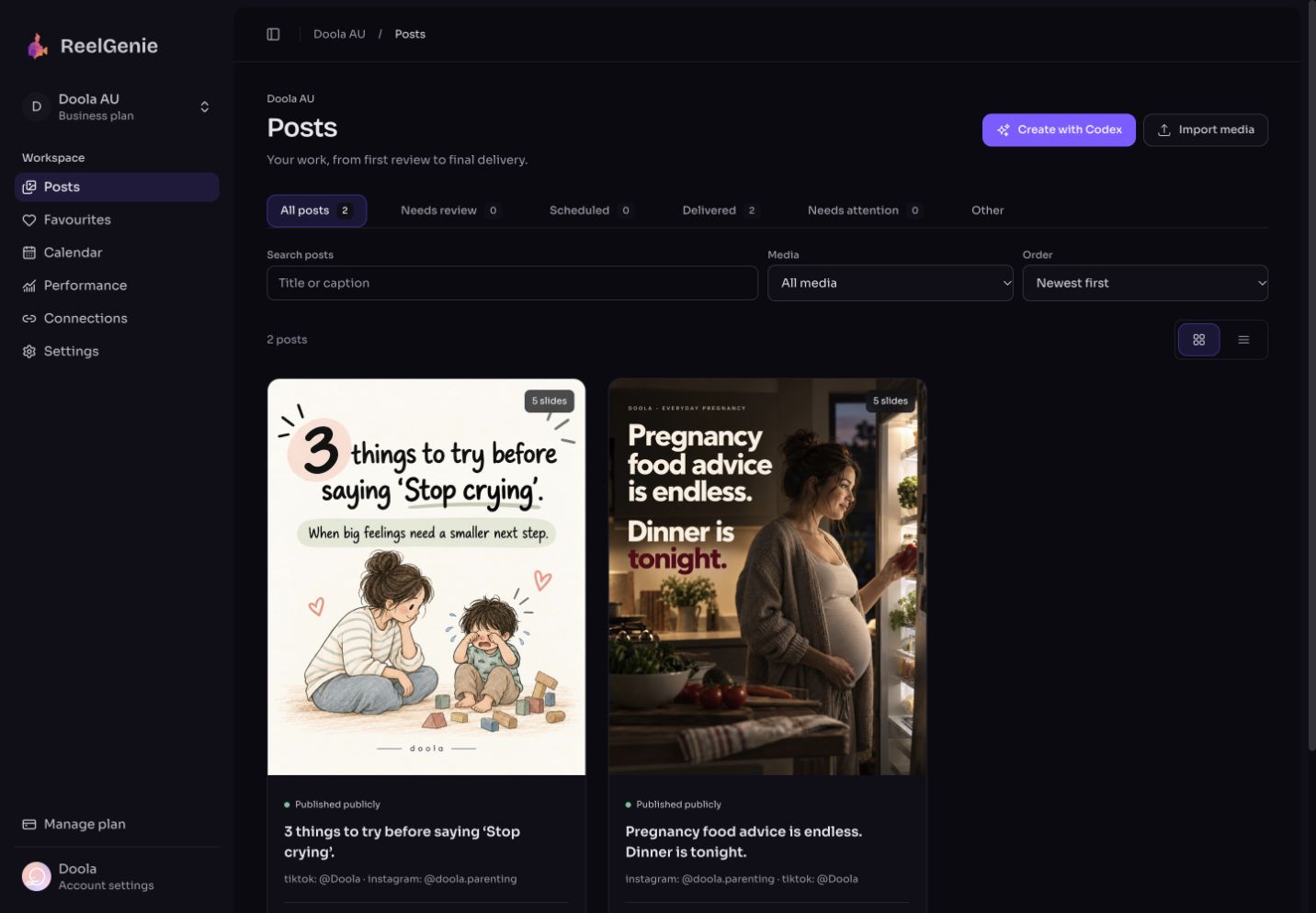
An Instagram carousel puts several images or videos into one swipeable post. ReelGenie's image workflow helps you develop a coherent sequence: a clear cover, useful insights on the following slides, and a natural next step for the reader.
Store the audience, voice, product facts and goal in workspace guidance. Codex can retrieve this context when preparing the post, so you don't need to rewrite your brief every time.
Save a Favourite for the creative approach. Reuse its composition and rhythm across different subjects, with original wording and images. A Favourite is a reference with instructions, not an editable canvas template.
Inspect every slide in the phone preview and read the complete caption. The preview preserves the image; it is not a promise of exact Instagram overlays or cropping. Ask Codex to revise any visual that misses the brief.
Choose your connected Instagram destination and approve immediate publishing or a schedule. Follow the delivery result in ReelGenie. Account permissions and platform eligibility determine what is available.
Codex generates finished images from an agreed direction. You can discuss a new hook, stronger illustration or different composition with it. ReelGenie stores those originals and lets you adjust titles, captions and publishing details; it does not expose editable text layers inside an image.
That distinction matters when comparing a free Instagram carousel maker or AI carousel generator. Choose this workflow if you want to create through a conversation and review the finished result before sending it.
Approval applies to the content, destinations, delivery mode and timing you reviewed. Review changes before another delivery. Editing a delivered post in ReelGenie does not automatically update a post already on Instagram.
Use the Codex setup guide to get connected, or see how the same creative approach supports TikTok slideshows. Both Free and Pro support up to 10 workspaces and unlimited connected accounts. Free allows one post per day across your team; Pro includes unlimited posts.
| Your starting point | A useful route |
|---|---|
| Finished photos and a caption | Use Instagram’s own multi-image posting flow, or import the finished files into ReelGenie for review and supported delivery. |
| An idea or reference, but no finished slides | Discuss the hook and script with Codex, generate the images, then review and publish through ReelGenie. |
| Need to drag text boxes and edit individual layers | Use a layer-based design editor. ReelGenie works with finished images; it does not provide canvas editing. |
| Several brands with different audiences | Keep guidance and connected accounts in separate workspaces, while sharing reference Favourites across the team. |
See the six-slide Doola example for the creative sequence and an actual delivery result.
ReelGenie's free plan includes 1 post per day and 10 workspaces. Create with Codex, review your finished post, and send it to your connected destination.
One post per day across your team. Up to 10 workspaces and unlimited connected accounts. A place to review finished media, adjust publishing details and follow delivery.
Unlimited posts, up to 10 workspaces and unlimited connected accounts. All features included. Save US$29 with annual billing.
Free publishing resets at midnight UTC. One carousel counts as one post across its destinations; retries do not count again. Contact us for more than 10 workspaces. Codex access and image-generation availability are separate from ReelGenie. Platform permissions still apply. Read the Pricing Policy.
Paste it into Codex. It installs the skill and guides you from account setup to your first delivery.
You handle sign-in, account consent and final approval.
Codex, install and read the ReelGenie skill from https://reelgenie.app/reelgenie-codex-skill.md. Use your in-app browser to guide my ReelGenie setup, create and review my first post, then publish it and verify delivery. Keep my token private and confirm the exact account and delivery mode before sending.
May we use analytics cookies to understand visits and setup steps? Your choice does not affect the free plan. Cookie policy