 ReelGenie
Finish your social posts.
Stay in your workstation.
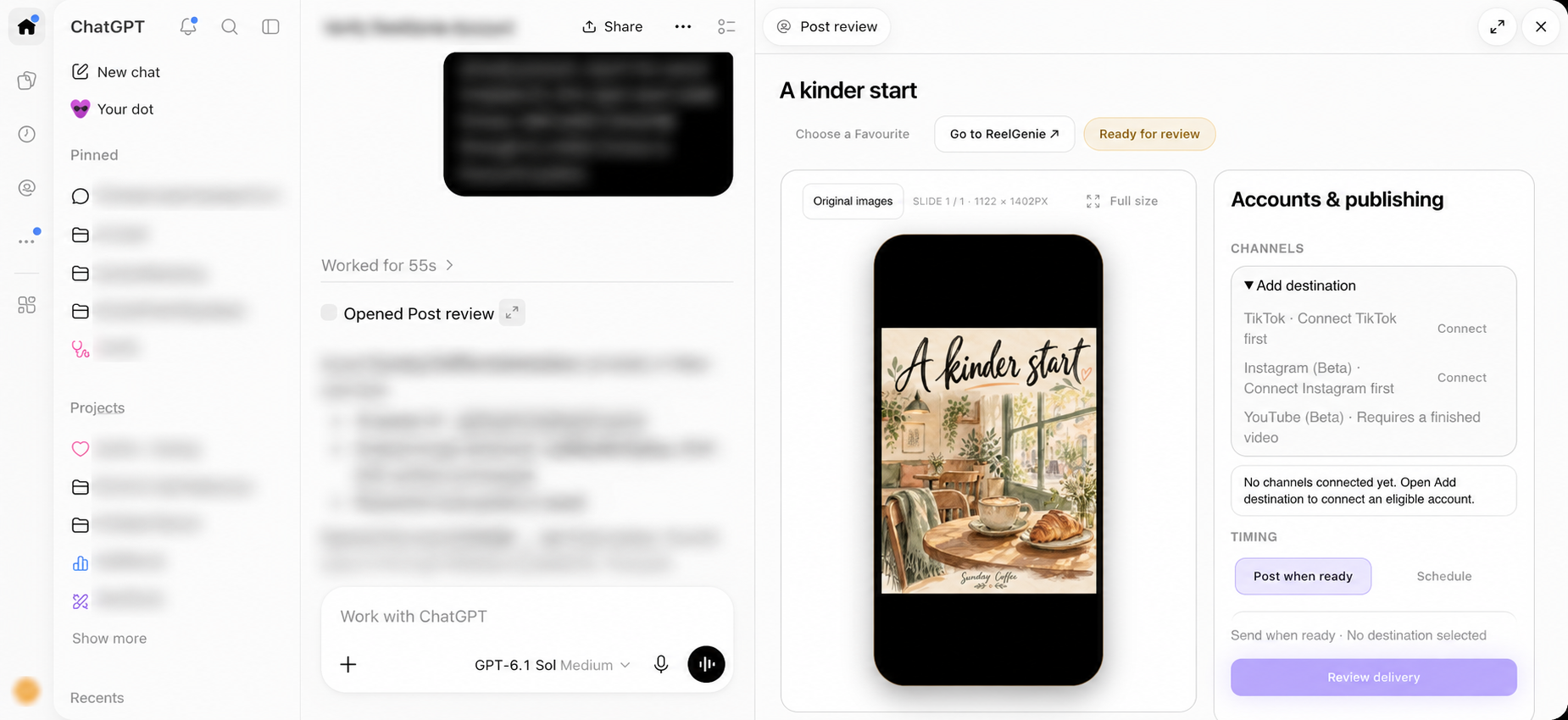
Complete the last mile of social creation in the same workstation: review your originals, choose accounts and schedule or publish. No manual downloading, re-uploading or file organizing between chat and ReelGenie.
Updated · Screens show fictional Sunday Coffee posts.
- 01 · ACCOUNTSign in once
Your default brand is ready automatically.
- 02 · CONVERSATIONMake the post
Finished originals move from chat into ReelGenie.
- 03 · REVIEWCheck every slide
Inspect your post in the phone frame.
- 04 · DELIVERYChoose when & where
Confirm the account, post and timing.
Your account, without the setup maze
After installing ReelGenie in a supported host, connect your ReelGenie account through the host’s account connection. Sign in or create an account, check the identity shown on the consent screen, and connect. Your default brand is selected automatically. You do not need to create or select a workspace to make your first post, paste an API token or connect a social account before creating.
Social accounts are connected later, when you are ready to deliver. Existing brands and their permissions remain tied to your signed-in account.
Say what you want to make
Describe your audience, idea and format. The host’s creative tools make the content; ReelGenie saves the finished original images or supported video into a private post. You can refine the idea in chat before delivery.
“Create a three-slide Instagram carousel for Sunday Coffee about slower mornings. Use a warm editorial style, write a short caption and save it in ReelGenie for review.”
You can also attach an existing finished video or image in the conversation. Ask ReelGenie to save that original. Files already available in chat do not need a second manual upload step.
Generation tools depend on your host. In the tested full-screen sidebar, Create a post starts a conversation but can leave the welcome panel open. Open the new chat from Recents to see its review. Within an existing chat, review opens beside the conversation.
Your post, in a phone frame
See the saved image or video as a post. Move through carousel slides, open the full-size original, or play the video. The review keeps destinations and publishing controls easy to find.
Caption, hashtags and first comment live under Edit post details when you need them. Changes must be saved and reviewed before delivery.
Your post is private at this point. Creating or previewing it does not publish anything.
Find a style. Keep your own idea.
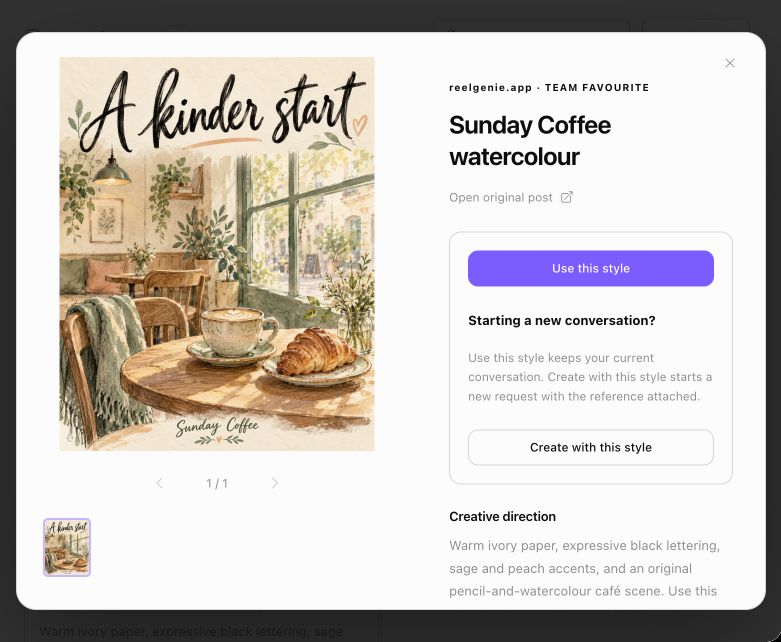
Open Choose a Favourite to explore your saved visual references. Preview the original slides and read the creative direction.
- Use this style selects the reference for your current conversation. Continue chatting with your topic.
- Create with this style starts a creative request using that reference and asks for essential missing brief details.
The reference guides a fresh original. Selecting it does not publish a post.
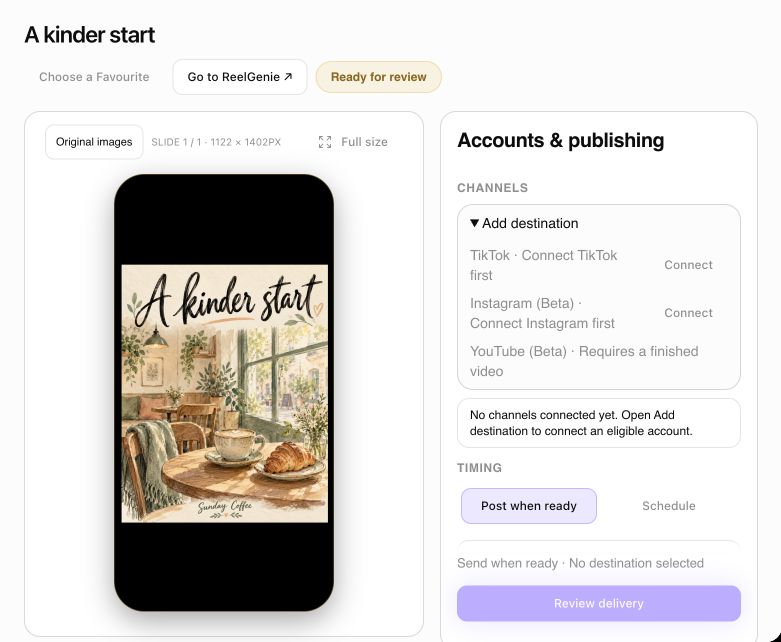
Decide where your post goes
The post review lists connected social accounts for the post’s brand. Choose the eligible destinations and delivery mode. If none are connected, use Connect to open ReelGenie’s account connection flow, then return to review.
Publish now or choose a calendar slot
For scheduling, peek at the current calendar before choosing a future date and time. Check the timezone shown with your selection. Review the exact post, caption, selected accounts and timing in the delivery confirmation before submitting.
A queued post is scheduled, not yet delivered. Check the eventual provider result. TikTok inbox delivery sends a draft for completion in TikTok; it does not mean the post is publicly published. Available platforms and modes depend on account eligibility and media format.
For advanced account management, brand guidance, reporting or broader planning, choose Go to ReelGenie to open the main web console.
A short tour of review and Favourites
This 18-second recording demonstrates captured private review and Favourite screens. It does not demonstrate live provider delivery or public-directory installation.
Download the fictional two-second video example to try an original-video conversation transfer.
Questions before your first post
Is the ReelGenie ChatGPT plugin publicly available?
It is currently in private preview. Public OpenAI directory publication is pending. You can use the ReelGenie web console now; supported Codex setup is explained in our connection guide.
Do I have to choose a workspace?
No separate workspace step is needed for your first post. Your default brand is selected automatically after sign-in. You can manage additional brands in the web console later.
Do I need to upload generated files again?
Finished originals available in the conversation are transferred automatically into a private post. If the original file is missing, supply it in chat so ReelGenie can save the actual file.
Can ReelGenie publish without asking me?
Creating a post or selecting a Favourite does not publish. Delivery requires approval of the exact post, destination and timing. Changed content must be reviewed again.
What stays inside ChatGPT?
The creative conversation, original post review, Favourite preview and selection, connected-account selection, timing and delivery confirmation. Advanced management opens in the ReelGenie web console.
Explore the workflow that matters to you
Your next social post starts in ChatGPT.
Start with a creative idea, finish the media handoff, or plan delivery.
Turn your ChatGPT ideas into social posts.From ChatGPT conversation to published post.
Create, preview and schedule social posts in ChatGPT.