 ReelGenie
From ChatGPT conversation to published post.
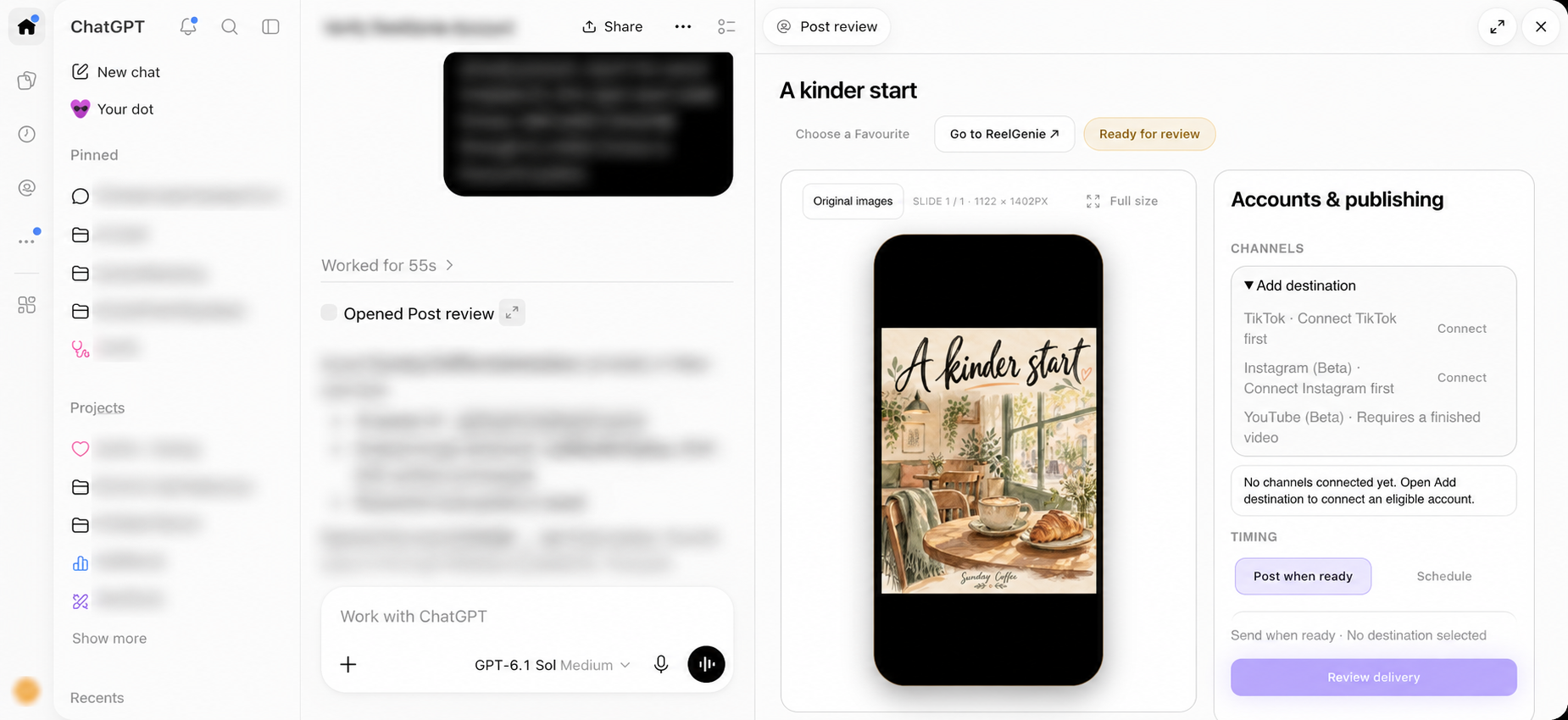
Complete the last mile of AI social posts in your workstation: automatically save originals, preview, select social accounts and approve delivery without downloading and re-uploading.
Updated
The last mile should not be file management
Making a good image is only part of making a social post. The finished media still needs to become a reviewable post, acquire the right caption, reach the right account and go out at the right time. Moving between downloads, folders and upload forms adds work without improving the creative idea.
ReelGenie keeps this handoff beside your conversation. The host creates or receives the original file. ReelGenie saves it privately and opens the exact post for review. The account and delivery controls sit alongside the phone preview, so the next action is a publishing decision.
Transfer the original once
For generated images, ask the conversation to save the finished post in ReelGenie for review. For a finished video, attach the original in your conversation and ask to save it. A separate ReelGenie upload step is unnecessary when the file is already available to the host.
“Save the finished originals from this conversation as a private ReelGenie post with the caption we agreed on. Open its phone preview. Do not publish yet.”
This workflow depends on genuine original files and host support. ReelGenie should ask for a missing original rather than fabricate a file, substitute a different image or treat a screenshot of a post as the original media.
Review where you made it
The saved post opens beside the chat. Inspect each carousel slide or play the original video. Open full size when you want to check detail. If the caption needs a small correction, expand Edit post details, save it and review the revised content before delivery.
The creative discussion and delivery surface have different jobs: chat shapes the idea; the panel shows what will be sent. Keeping them in the same workstation makes those decisions easier to connect.
Choose the real destination
Review lists the connected social accounts for the post’s brand. Choose the intended account, then a supported delivery mode. New users can make and save a post before connecting social accounts. When ready, Connect opens account setup in ReelGenie and you can return to review.
Eligibility varies by provider and media format. TikTok inbox delivery creates a draft that needs completion in TikTok. It is different from public publication. A provider that cannot accept this media should remain unavailable rather than silently changing the post.
Approval completes the decision
Review the exact post, selected accounts and timing before approving delivery. Creation, original saving and Favourite selection are not publishing approval. If the content changes, inspect the new version.
A scheduled queue is a promise to attempt delivery later, not a completed provider result. Check the eventual outcome. Our scheduling guide explains the date, timezone and confirmation steps. Use Go to ReelGenie for more advanced management.
Continue the journey
Your next social post starts in ChatGPT.Turn your ChatGPT ideas into social posts.
From ChatGPT conversation to published post.
Create, preview and schedule social posts in ChatGPT.
Full visual walkthrough · Create a ReelGenie account · Get support