 ReelGenie
Your next social post starts in ChatGPT.
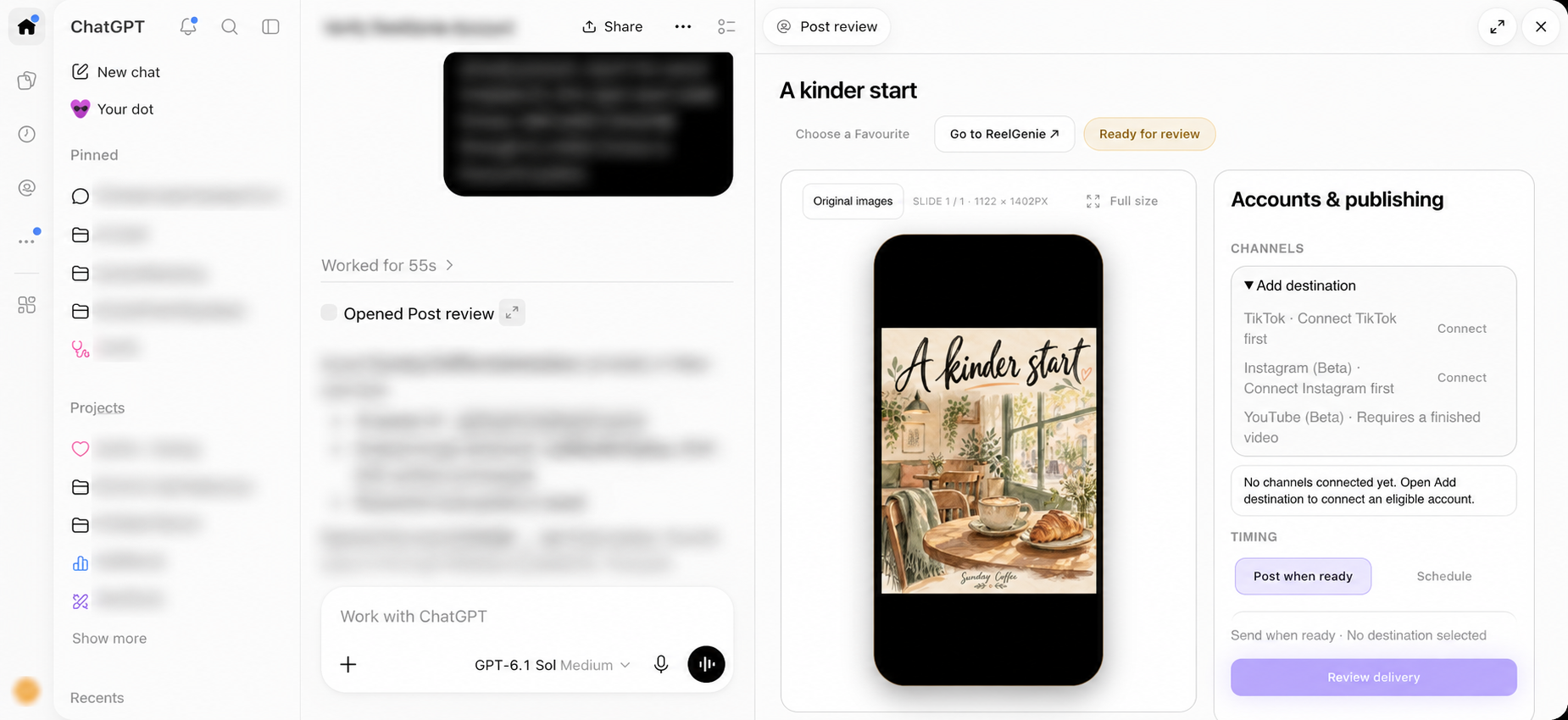
Start your first ReelGenie post in ChatGPT: connect once, use the automatic default brand, create privately and review without workspace setup or manual file uploads.
Updated
One connection gets you started
Once ReelGenie is installed in a supported host, connect your ReelGenie account through the host’s account connection. Sign in or create an account, check the identity shown on consent, then connect. Use the account you want to save posts under.
The first brand is ready automatically. There is no separate workspace creation or selection step for your first post, and no token to paste into chat. A social destination is needed for delivery, but you can make and review a private post before connecting one.
Start in the conversation you already use
You can begin with a simple topic: a new café menu, an app feature or a useful tip for your audience. Tell the chat your intended format and ask to save the finished post in ReelGenie for review. The host handles the creative tools; ReelGenie handles the saved-post handoff.
“Help me make a social post about our new Sunday Coffee menu. Ask only what you need, create the finished original, then save it privately in ReelGenie and open its phone preview.”
Finished files available in the conversation transfer into the private post automatically. You do not need to download them, keep track of a local folder or upload them again in a second app. If you already have a finished original, attach it once in chat.
Know which screen does what
The welcome panel starts a creation request or opens your posts. The conversation shapes the idea. Post review shows the saved original in a phone frame and brings social accounts and timing into the same workstation. Favourites lets you inspect saved references and select a style for your conversation.
In the tested full-screen sidebar, creating a request may leave the welcome panel open while a new chat is created. Open that conversation from Recents to find its attached review. In an existing conversation, review opens beside the chat.
Your first review is a safe stopping point
Inspect the image or play the video. For a carousel, check every slide and its order. Use full size when you want a closer look. Caption, hashtags and first comment are available under Edit post details, and any changes should be saved and reviewed.
You can stop here with a private saved post. There is no requirement to connect social accounts or approve delivery just because you created something. The library keeps the post available when you return.
Connect a destination when you are ready
Choose Connect from review to set up an eligible social account in ReelGenie, then return to the post. Select the intended account and supported delivery mode. Choose immediate delivery or a future calendar date and confirm the exact post, account, time and timezone before submitting.
Nothing is published by selecting a Favourite or opening a preview. Delivery requires approval, and the eventual provider result needs to be checked. Go to ReelGenie takes you to the main web console for advanced features whenever you need them.
Continue the journey
Turn your ChatGPT ideas into social posts.From ChatGPT conversation to published post.
Create, preview and schedule social posts in ChatGPT.
Full visual walkthrough · Create a ReelGenie account · Get support