 ReelGenie
A Buffer alternative for Claude, Codex and MCP
Pick Buffer if you also post to LinkedIn, X, Facebook, Threads, Pinterest or Bluesky; its MCP server works on every plan, including Free. Pick ReelGenie if your agent makes the post and you want each delivery approved on every plan, with the exact files in a phone frame. Buffer’s approval of drafts is on its Team plan.
ReelGenie’s forever-free plan includes 30 posts a month and 1 brand. Solo is US$19/month. Your Claude, Codex or ChatGPT plan is separate.
Start free – 30 posts a month, no card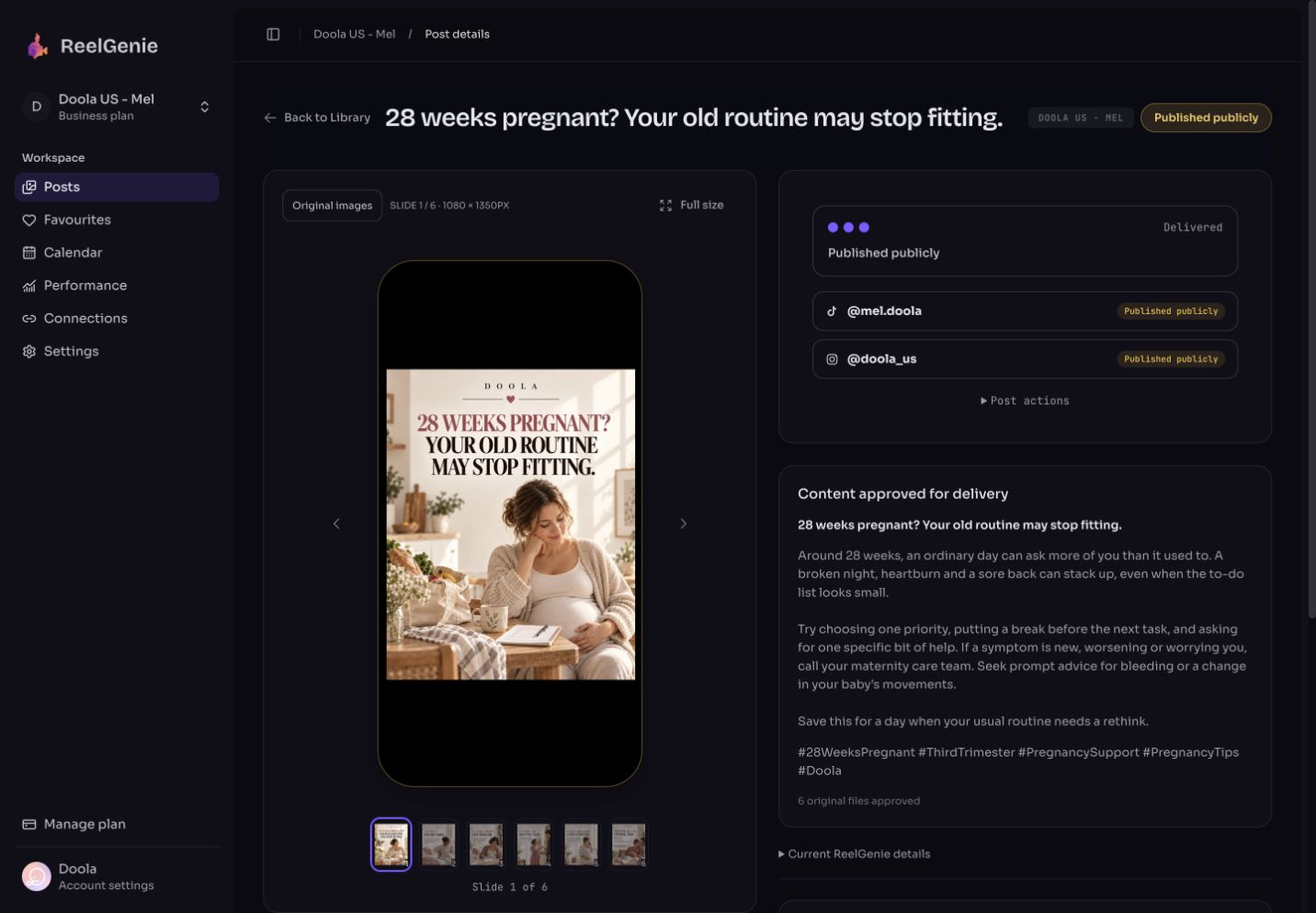
The short answer
- Buffer does more of some things, and the table below says which.
- ReelGenie posts only to TikTok, Instagram and YouTube, and doesn’t make photos or video. Your agent makes the post.
- ReelGenie holds each delivery until the exact post, account and time are approved, on every plan, then shows what each platform actually did. Buffer’s approval of drafts is on its Team plan.
- Both connect to AI agents through MCP on every plan, including the free ones. ReelGenie’s free plan is 30 posts a month and 1 brand. Buffer’s is 3 channels with 10 scheduled posts per channel.
ReelGenie and Buffer side by side
We read each fact on Buffer’s own pages on 14 November 2026. Prices are in US dollars a month.
| What | ReelGenie | Buffer |
|---|---|---|
| Platforms | 3: TikTok, Instagram and YouTube. | Its MCP page names Instagram, Facebook, TikTok, LinkedIn, X, YouTube, Threads, Pinterest, Google Business Profile, Bluesky, Mastodon and Substack (MCP page). |
| AI agent access | MCP for Claude, Claude Code, Codex and other MCP clients, on every plan including Free. | An MCP server included on every plan, including Free, for drafting and scheduling posts, managing the queue, saving ideas and reading Buffer insights (MCP page). Its help center has setup steps for Claude, ChatGPT, Cursor, Notion, Perplexity, Grok and others, most of them by OAuth sign-in, and says Claude Code and Codex work with the same MCP server (AI assistants help). |
| Approval before sending | Held by ReelGenie until it is approved, on every plan. Each delivery waits until the exact post, its account and its time are approved, with a phone-frame preview. Your agent can ask for approval. Only a person can give it, in ReelGenie or in the chat. | Approval of drafts is on the Team plan. Team members with Needs Approval access request approval, and the owner or Full Access members approve; their posts from the API or the MCP server are always saved as drafts awaiting approval. A rejected draft goes back to the drafts list (approval guide). Its MCP page says posts from an AI assistant land in your queue as drafts or scheduled posts, and that nothing publishes without you seeing it first (MCP page). |
| More than posting | Posting, scheduling, each account’s result, and views, likes and comments synced after posting. | An AI Assistant on every plan, and API keys on every plan, from 1 on Free to 5 on Team (pricing). Its MCP can review recent posts and pull Buffer insights (MCP page). |
| Free plan and price | Free forever: 30 posts a month, 1 brand and 3 connected accounts. Solo is US$19/month for unlimited posts and 10 accounts. | Free: up to 3 channels and 10 scheduled posts per channel. Essentials is $5 a month per channel ($60 billed yearly) and Team is $10 a month per channel ($120 billed yearly), both with unlimited scheduled posts; content approval workflows are on Team (pricing). |
| Failed posts | Each account shows Scheduled, Draft ready, Published or Failed with the platform’s reason. Views, likes and comments sync later. | A Post Failures alert, on by default, by email and by push to the Buffer mobile app when a scheduled post fails to publish (notifications). Its error libraries explain each platform message; for YouTube, it says to check your channel and retry the post from your queue (YouTube error library). |
Where Buffer is better
- More platforms. Its MCP page names LinkedIn, X, Facebook, Threads, Pinterest, Google Business Profile, Bluesky, Mastodon and Substack as well as Instagram, TikTok and YouTube. ReelGenie has three.
- Ready-made setup for many AI tools. Its help center walks through connecting Claude, ChatGPT, Cursor, Notion, Perplexity, Grok, Zapier and n8n, mostly with an OAuth sign-in and no key to paste.
- Low price per channel. Essentials is $5 a month per channel with unlimited scheduled posts, so a single channel costs less than ReelGenie’s Solo plan.
- An idea board and insights. Its MCP can save ideas, review recent posts and pull Buffer insights, and every plan has Buffer’s AI Assistant.
- Team roles. On Team, members with Needs Approval access send drafts for review, and even their API and MCP posts wait as drafts until approved.
Where ReelGenie fits
- Approval on every plan. Creating a post never sends it. Your agent saves it privately, and nothing goes out until the post, the account and the time are approved. Your agent can ask for approval. Only a person can give it, in ReelGenie or in the chat, so you approve every post before it goes live.
- A faithful preview. ReelGenie stores the exact files your agent made and shows them in a phone frame, in order, with the full caption, before you approve.
- Each account’s result. Every account gets its own status: Scheduled, Draft ready, Published or Failed with the platform’s reason in plain words. Scheduled isn’t posted, and you can see whether it actually posted.
- Agent access on every plan. Claude, Claude Code, Codex and other MCP clients connect on the forever-free plan: 30 posts a month and 1 brand, 3 connected accounts, with no card. Solo is US$19/month for unlimited posts and 10 accounts.
- Honest about TikTok. For most accounts today TikTok receives the post as a draft, and the result reads Draft ready: open TikTok, add a sound and post. Direct Post appears only when TikTok has enabled it for your account.
Which to choose
- Choose Buffer if you post beyond TikTok, Instagram and YouTube, you want one scheduler connected to many AI tools, or you pay per channel for a few channels.
- Choose ReelGenie if your agent makes the post, you want to see the exact files and approve each delivery on any plan, and you want each account’s own result.
Try it with your agent
Create a free ReelGenie account, connect your social accounts on the Accounts page, then follow a guide:
Setting up for the first time? Start with Claude or Codex. Compare plans.
Questions about Buffer alternatives
- Does Buffer have an MCP server for Claude?
- Yes. Buffer’s MCP server is included on every plan, including Free, and its help center has setup steps for Claude and ChatGPT by OAuth sign-in. It says Claude Code and Codex work with the same server. ReelGenie also connects to Claude, Claude Code, Codex and other MCP clients through MCP on every plan.
- Does Buffer have approvals?
- Yes, on the Team plan. Members with Needs Approval access request approval on their drafts, and the owner or Full Access members approve them; posts those members make through the API or MCP server are saved as drafts awaiting approval. In ReelGenie, approval is on every plan: each delivery waits until the exact post, account and time are approved, with a phone-frame preview of the files.
- How much does Buffer cost compared with ReelGenie?
- Buffer’s Free plan covers up to 3 channels with 10 scheduled posts per channel, and paid plans are priced per channel: Essentials is $5 a month and Team is $10 a month per channel. ReelGenie’s forever-free plan is 30 posts a month, 1 brand and 3 connected accounts, and Solo is US$19/month for unlimited posts and 10 accounts.
- Does ReelGenie post to LinkedIn, X or Facebook?
- No. ReelGenie posts only to TikTok, Instagram and YouTube. Buffer also covers LinkedIn, X, Facebook, Threads, Pinterest, Google Business Profile, Bluesky, Mastodon and Substack.
- How do I know a post went out?
- In ReelGenie, each account shows its own result: Scheduled, Draft ready, Published or Failed with the platform’s reason. Scheduled isn’t posted. For most TikTok accounts the result is Draft ready: the post is in your TikTok inbox, and you open TikTok, add a sound and post. Buffer sends a Post Failures alert by email and push when a scheduled post fails to publish.
Sources
Checked on Buffer’s own pages on 14 November 2026. Prices and features change; if something here is out of date, tell us and we’ll correct it.